How to Fix a Smartphone That Overheats Quickly
Smartphone overheats quickly? Here are the real causes, 10 proven fixes, and the warning signs of malware, fake chargers, or a battery needing repair.
Fix a Smartphone That Overheats Quickly
Introduction
When your smartphone overheats after ten minutes of use, it is more than an annoyance. A hot phone slows down, drains its battery faster, and in the worst cases can damage the battery for good. Most people try a quick fix like taking off the case, then forget about it until the next time their pocket feels like a hand warmer.
The truth is that some heat is normal. Phones get warm when they charge, run games, record video, or search for a weak signal. The problem starts when the heat comes too fast, stays too long, or shows up while you are barely using the phone. That pattern usually points to a specific cause, and once you find it, the fix is often simple.
This guide walks through those causes in plain language and gives you ten practical fixes, ordered from easiest to most serious. It also covers the warning signs that mean you should stop troubleshooting and get help, like a swollen battery or a phone that heats up while sitting idle.
We also look at real cases where overheating had a criminal or corporate cause: Android malware that secretly mined cryptocurrency until a test phone’s battery burst its case, counterfeit chargers sold as genuine, and the Samsung throttling dispute that ended up in a Korean court. Knowing these stories helps you separate an ordinary warm phone from one that is being misused.
Why Your Smartphone Overheats So Quickly
A phone has no fan. All the heat from its processor, screen, radios, and battery has to escape through the frame and glass. When the phone produces heat faster than it can shed it, the temperature climbs. Here are the usual reasons that happens.
Heavy apps and games
Games, video editing, long camera sessions, and navigation push the processor and graphics chip hard. This is the most common and least worrying cause. The phone should cool down within a few minutes of stopping.
Charging, especially fast or wireless charging
Charging always creates heat, and fast charging and wireless charging create more. Phone overheating while charging gets much worse if you play games or stream video at the same time, because the charging circuit and the processor are both producing heat in the same small space.
Hot environments and thick cases
A phone on a car dashboard, in direct sunlight, or in a pocket on a hot day starts from a high baseline. Rugged or leather cases trap heat. In places with summer temperatures above 40°C, this alone can trigger a heat warning.
Weak signal
When mobile signal is poor, the phone boosts its radio power to stay connected. That uses more energy and generates more heat, which is why phones often get warm in basements, lifts, or rural areas.

Background apps and software bugs
Apps that keep running in the background, sync constantly, or track location can keep the processor busy even when the screen is off. A buggy update can do the same thing until the developer fixes it.
Malware
If your phone is hot while you are not using it, and battery drain is unusually fast, malware is a real possibility. Some malicious apps secretly use your phone’s processor for cryptocurrency mining or ad fraud. We cover a well-documented case below.
An aging or damaged battery
Worn batteries have higher internal resistance, which turns more energy into heat. Physical damage from a drop, or poor-quality replacement batteries, can also cause abnormal heating. This is the cause you should take most seriously.
When a Hot Phone Becomes Dangerous
Most overheating is uncomfortable but harmless. Stop using the phone, unplug it, and get it inspected if you notice any of these signs:
- Battery swelling: the screen lifts, the back panel bulges, or the phone rocks on a flat table.
- A burning or chemical smell.
- The phone is too hot to hold comfortably even when idle.
- Smoke, hissing, or popping sounds.
- The phone shuts down repeatedly with a temperature warning during light use.
A swollen lithium-ion battery can catch fire if punctured or pressed. Do not try to push it back into place, and do not charge the phone again until a technician has checked it.
10 Proven Fixes When Your Smartphone Overheats
Work through these in order. The first few take seconds. The later ones take more effort but solve the stubborn cases.
1. Stop, unplug, and let it cool naturally
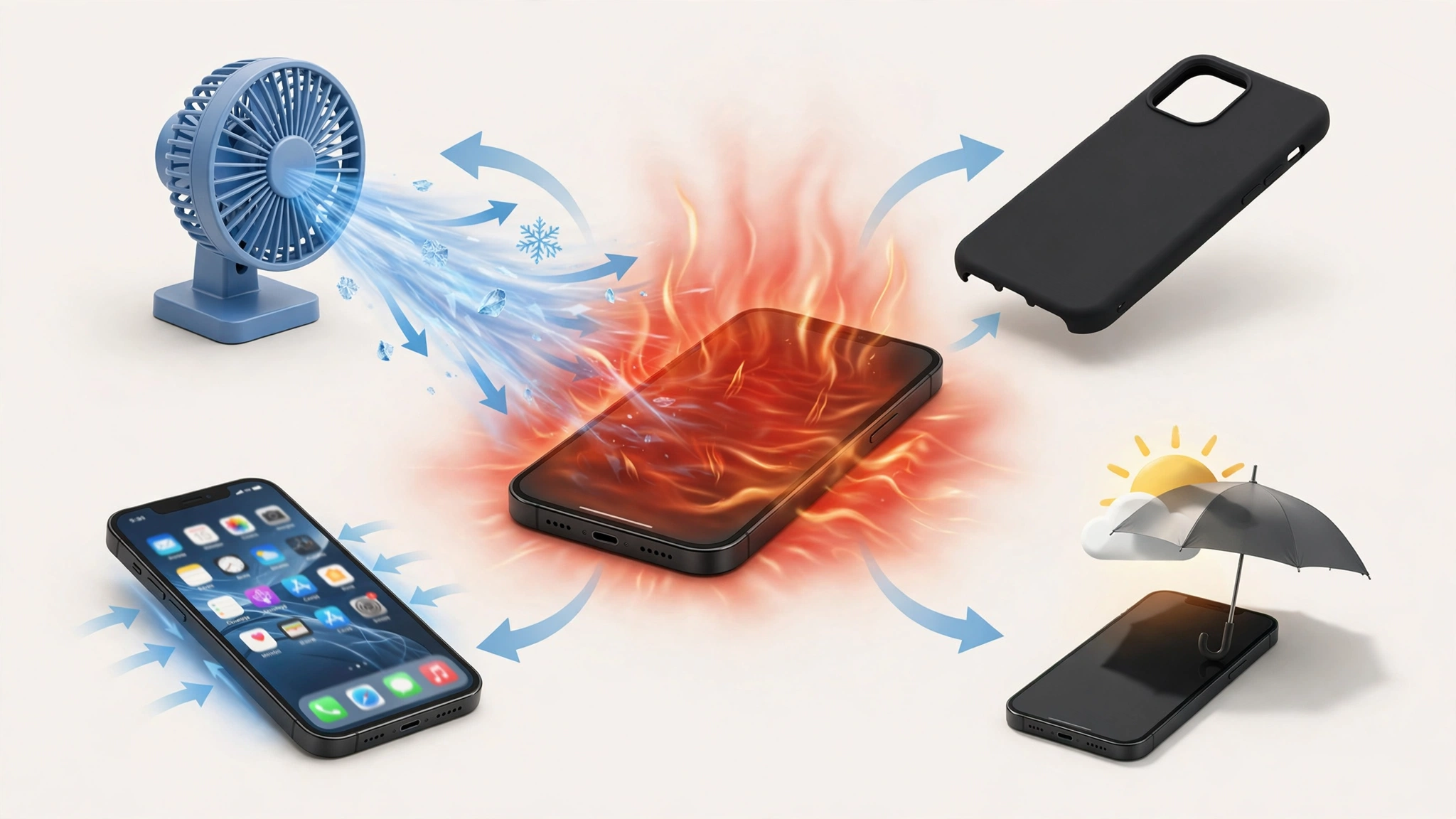
Close what you are doing, unplug the charger, and remove the case. Place the phone on a hard surface in the shade or near a fan. Never put it in the fridge or freezer. Rapid cooling can cause condensation inside the phone, which leads to water damage.
2. Do not use heavy apps while charging
This is the single most effective habit change. If you must game or stream, either charge first or play on battery. Charging and heavy processing together is the fastest way to make a smartphone overheat.
3. Switch off fast charging when you are not in a hurry
Most Android phones let you disable fast charging in battery settings. Use a standard charger overnight and fast charging only when you need a quick top-up. If wireless charging makes the phone hot, use a cable instead.
4. Use only genuine or certified chargers and cables
Cheap chargers often lack proper voltage regulation and temperature cutoffs. Use the charger that came with your phone, one from the manufacturer, or a well-known brand with proper certification. A charger that gets very hot itself is a warning sign.
5. Find and limit battery-hungry apps
Go to Settings > Battery and look for apps using power in the background. On iPhone, check Settings > Battery. On Android, check Settings > Battery > Battery usage. Restrict background activity for apps you rarely use, and uninstall anything you do not recognize.
6. Lower screen brightness and refresh rate
A bright, high refresh rate screen produces a lot of heat. Use auto brightness, and if your phone runs at 120Hz, try a standard 60Hz mode during long sessions. Dark mode helps on OLED screens.
7. Turn off what you are not using
Bluetooth, GPS, hotspot, and mobile data all add load. Switch off hotspot when you are done, and use Wi-Fi instead of mobile data in weak signal areas. Airplane mode is a quick way to cool a phone that has been hunting for signal.
8. Update your software and apps
Updates often fix bugs that keep the processor busy for no reason, and they improve thermal throttling and battery management. Install system updates and app updates regularly from official sources only.
9. Check for malware using safe mode
If the phone heats up while idle, restart it in safe mode, which loads only built-in apps. If the heating stops in safe mode, a third-party app is the likely cause. Uninstall recently added apps one by one, starting with anything downloaded outside Google Play or the App Store. Run a scan with Google Play Protect or a reputable security app. As a last resort, back up your data and do a factory reset.
10. Check battery health and replace if needed
On iPhone, check Settings > Battery > Battery Health. On many Android phones, look in Settings > Battery or Device care. If capacity is below 80%, or the battery is swollen, replace it at an official or authorized service center. Avoid cheap unbranded batteries, which are a common cause of repeat overheating. Apple’s guide to maximizing battery performance and lifespan explains how heat and battery aging are linked, and the same principles apply to Android phones.
Real Cases Where a Smartphone Overheats Because of Wrongdoing
Not every hot phone is the owner’s fault. In some well-documented cases, criminals or companies were behind the heat. These stories are worth knowing because they show which warning signs deserve attention.
Loapi: malware that mined cryptocurrency until the battery burst
In December 2017, researchers at Kaspersky Lab uncovered an Android trojan called Loapi. It was hidden inside fake antivirus apps and adult content apps spread through third-party app stores and online ads, some impersonating well-known security brands.
Loapi did many illegal things at once. It showed aggressive ads, sent text messages, crawled websites, could join DDoS attacks, and secretly mined the Monero cryptocurrency using the victim’s processor. When Kaspersky ran it on a test phone, the constant load overheated the device so badly that within two days the battery bulged and deformed the phone’s cover. The malware also fought removal by repeatedly closing the settings screen, so getting rid of it required booting into safe mode. CSO Online’s report on the Loapi malware covers the full findings.
The lesson: a phone that is hot while idle, drains fast, and shows strange ads may be infected. Install apps only from official stores, and be especially suspicious of “antivirus” or “phone cooler” apps from unknown sources. This practice of secretly using someone’s device to mine cryptocurrency is known as cryptojacking, and it is illegal unauthorized use of a computer in most countries.
Counterfeit chargers sold as genuine
In 2016, Apple sued a supplier named Mobile Star, saying that nearly 90% of the “genuine” Apple chargers and cables it had bought through Amazon over several months were fake. Counterfeit chargers often skip the insulation, voltage regulation, and temperature protection that real ones include. The result can be a hot phone, a damaged battery, an electric shock, or a fire.
Customs agencies around the world regularly seize shipments of fake chargers, but many still reach markets and online stores. The lesson: if your phone gets unusually hot only with one charger, stop using that charger. A brand-name charger at a fraction of the normal price is almost certainly a counterfeit charger.
Samsung’s Game Optimizing Service dispute
In early 2022, owners of Samsung’s Galaxy S22 discovered that a preinstalled tool called Game Optimizing Service (GOS) was cutting gaming performance to control heat, and it could not be switched off at first. Critics also noted that benchmark apps were not throttled the same way, which made the phones look faster in reviews than in real games. Samsung later released an update letting users reduce the throttling.
In 2022, 1,882 Galaxy S22 owners filed a class-action lawsuit in South Korea. A Seoul court found that Samsung’s advertising was likely to mislead consumers, though early rulings largely went Samsung’s way on damages. In March 2026, reports said a court had ordered Samsung to pay an undisclosed amount to the plaintiffs, and South Korea’s Fair Trade Commission has been weighing a separate fine reported at tens of millions of dollars. Android Authority’s coverage of the GOS ruling explains the earlier court decision.
The lesson: thermal throttling itself is normal and protects your phone. The problem was hiding it. Today, most phones let you see and adjust performance modes, so check your settings if games suddenly feel slow when the phone is hot.
Apple’s battery throttling case
Apple faced a similar dispute after it quietly slowed older iPhones with worn batteries in 2016 and 2017 to prevent shutdowns. It led to fines in Italy and France and a US settlement of up to $500 million. One lasting result is the Battery Health screen on iPhones, which helps you spot an aging battery before it starts overheating or shutting down.
Unsafe battery replacements
Low-quality or counterfeit replacement batteries are sold widely in repair markets. They may have lower real capacity than advertised and weaker internal protection, which makes overheating and swelling more likely. If a phone started running hot right after a battery swap, the new battery is the first suspect. Always ask for a genuine or certified part and a receipt.
Smartphone Overheating Myths to Ignore
- “Put it in the fridge to cool it fast.” This risks condensation and internal water damage.
- “Phone cooler apps fix overheating.” Most do nothing useful, and some are adware or malware.
- “Overheating means the phone is broken.” Usually it means the phone is working hard or sitting in the heat.
- “Closing all apps cools the phone.” Force-closing everything can make the phone work harder to reload apps. Close only apps that are misbehaving.
Conclusion
When a smartphone overheats quickly, the cause is usually ordinary: heavy apps, charging while gaming, a hot environment, weak signal, or background apps, and the ten fixes in this guide (cooling it naturally, avoiding heavy use while charging, limiting fast charging, using certified chargers, controlling background apps, lowering brightness, turning off unused features, updating software, checking for malware in safe mode, and replacing a worn battery) solve most cases. Heat while idle, fast battery drain, or a swollen battery are different, because they can point to malware like Loapi, which cooked a test phone’s battery in two days, to counterfeit chargers or batteries, or to hidden throttling of the kind that put Samsung and Apple in front of courts and regulators, so treat those signs seriously and get the phone checked by an authorized technician.