Best Free Alternatives to Expensive Paid Software
Free alternatives to paid software for office work, design, video, and security, plus piracy cases that show why legal tools are the smarter choice.
Free Alternatives to Paid Software: 15 Best Legal Tools That Save Real Money in 2026
Introduction
Free alternatives to expensive software have quietly become good enough for students, freelancers, and small businesses to run almost everything without paying a single subscription. That is not how it used to be. Ten years ago, “free” usually meant clunky, limited, or packed with toolbars. Today, some of the most respected tools in their fields cost nothing at all. DaVinci Resolve, used to colour-grade Hollywood films, has a powerful free version. Blender powers professional 3D work. Professional designers now have a free Affinity.
The cost of paid software keeps rising. A full creative suite, an office subscription, a video editor, a PDF editor, and a security product can add up to hundreds of dollars a year, and many people in countries like Pakistan, India, and Bangladesh pay far more as a share of their income. So a lot of them reach for the obvious shortcut: a cracked copy.
That shortcut has a real price. Cracked software is one of the most common ways malware spreads, and security researchers have tied cracked downloads to password theft, ransomware, and drained crypto wallets. Businesses have paid large settlements after software audits, and a few individuals have gone to prison over counterfeit software.
This guide lists 15 free, legal tools that can replace popular paid software, explains what each one does well and where it falls short, and covers the real cases that make piracy a poor bet. It also shows how to switch without losing your files and how to use free software ethically.
What Top-Ranking Lists of Free Alternatives Miss
I reviewed the pages ranking for “best free alternatives to paid software,” “free Photoshop alternative,” and “free Microsoft Office alternative” in October 2026. Most are long lists of 15 to 30 tools, often mixing streaming services, AI chatbots, and desktop software. Several are published by software companies recommending their own products.
What they usually skip:
- The difference between open source, freeware, freemium, and free trials, which affects whether you can use a tool commercially
- Honest weaknesses, such as file compatibility and missing professional features
- The legal and security risks of cracked software, with real cases
- How to switch without losing years of files
Primary keyword
- free alternatives (focus keyword)
Secondary and LSI keywords used in this article
- free software
- open-source software
- free Microsoft Office alternative
- free Photoshop alternative
- free video editing software
- paid software
- software piracy
- cracked software
- software licence
- freemium
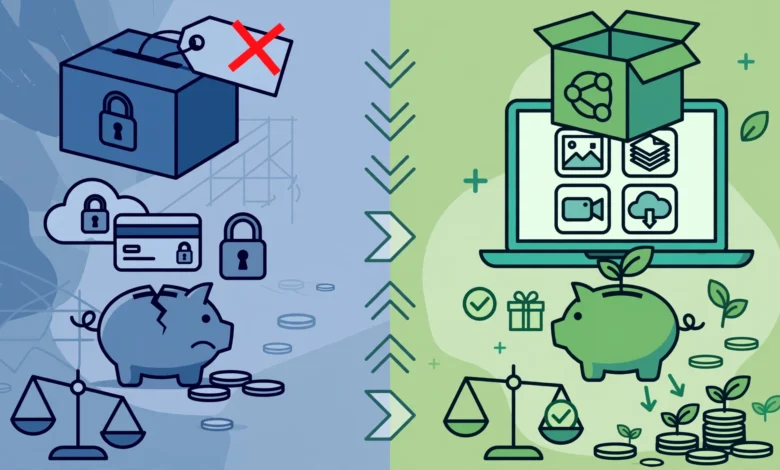
Why Free Alternatives Can Be Completely Legal
Many people assume anything free must be pirated or low quality. In reality, legal free software exists under several business models, and knowing which one you are using tells you what you can and cannot do with it.
Open-source software
Open-source software is released under a licence that lets anyone use, study, modify, and share it. LibreOffice, GIMP, Inkscape, Blender, Audacity, VLC, and OBS Studio are all open source. They are usually free for personal and commercial use, maintained by communities and foundations, and funded by donations or companies that rely on them.
Freeware
Freeware is closed-source software that the owner chooses to give away. DaVinci Resolve’s free version and the new free Affinity are examples. Companies do this to build a user base, sell hardware, or upsell paid versions. Always read the licence, since some freeware forbids commercial use.

Freemium
Freemium tools offer a free plan with limits and charge for more features, storage, or users. Canva, Figma, and many cloud tools work this way. They are legal and often generous, but the free plan can shrink over time.
Free trials are not free alternatives
A 7-day or 30-day trial of paid software is a delayed purchase, not a free tool. Note the end date and how to cancel before entering card details.
The key question: can I use it for work?
Before relying on any tool for client or business work, check its software licence for three things:
- Commercial use is allowed
- Your files and exports belong to you
- There is no limit on the number of users or devices that affects you
Free Alternatives for Office Work and Productivity
Office software is where most people overspend, often buying a subscription just to edit a few documents a month. These three options cover almost everything.
1. LibreOffice (replaces Microsoft Office desktop apps)
LibreOffice is the best-known free Microsoft Office alternative. It includes Writer for documents, Calc for spreadsheets, Impress for presentations, Draw for diagrams, and Base for databases. It runs on Windows, Mac, and Linux, works fully offline, and can open and save Word, Excel, and PowerPoint files. It is maintained by The Document Foundation and is free for personal and business use.
- Strengths: no account needed, no ads, strong PDF export, open file formats
- Weaknesses: complex Word layouts and Excel macros sometimes need fixing after conversion
2. ONLYOFFICE Desktop Editors
ONLYOFFICE offers free desktop editors with an interface very close to Microsoft Office’s ribbon. Many users find its handling of Word, Excel, and PowerPoint formatting more faithful than LibreOffice’s.
- Strengths: familiar look, good compatibility with Office files
- Weaknesses: some advanced collaboration features require the paid server version
3. Google Docs, Sheets, and Slides
Google’s web office suite is free with any Google account and excels at real-time collaboration. Several people can edit the same document at once, with comments and version history. It also opens and exports Office formats.
- Strengths: collaboration, works on any device with a browser, automatic saving
- Weaknesses: needs internet for most work; storage is shared with Gmail and Google Photos
Microsoft also offers free web versions of Word, Excel, and PowerPoint with a Microsoft account, which are useful when you need perfect compatibility for occasional edits.
Free Alternatives for Design, Video, Audio, and 3D
Creative software is the most expensive category and the most pirated. Fortunately, it also has some of the strongest free options.
4. GIMP and Photopea (replace Adobe Photoshop)
GIMP is the long-running open-source free Photoshop alternative for photo editing, retouching, and compositing, with GIMP 3.0 released in 2025 bringing a more modern interface. Photopea runs in your browser, looks very much like Photoshop, and even opens PSD files. Use GIMP for serious offline work and Photopea for quick edits.
5. Affinity by Canva (replaces much of Adobe Creative Cloud)
In October 2025, Canva relaunched Affinity as a single app combining vector design, photo editing, and page layout, and made it free. AI features need a paid Canva plan, but the core professional tools do not. It opens PSD, AI, PDF, and IDML files, which makes moving from Adobe easier.
6. Inkscape (replaces Adobe Illustrator)
Inkscape is a free vector editor for logos, icons, and illustrations. It uses the open SVG format and exports to PDF and other common formats.
7. DaVinci Resolve (replaces Premiere Pro and Final Cut Pro)
DaVinci Resolve’s free version is the most capable free video editing software available, with professional editing, colour grading, audio mixing, and visual effects in one app. It needs a reasonably powerful computer. For older PCs, Shotcut and Kdenlive are lighter open-source choices.
8. Audacity (replaces Adobe Audition for basic audio work)
Audacity records and edits audio for podcasts, voiceovers, and music clean-up. It supports noise reduction, effects, and plugins, and is free and open source.
9. Blender (replaces Maya, 3ds Max, and Cinema 4D)
Blender is an open-source 3D suite used for modelling, animation, rendering, and visual effects. It has been used in independent films, games, and advertising, and has an enormous library of free tutorials.
Honest limitations
If you work in a studio or agency that exchanges Adobe project files daily, switching completely may not be practical. Free tools are ideal for learning, freelancing, and solo work, and many professionals combine them with a single paid tool where it truly matters.
Free Alternatives for Security and Everyday Utilities
These tools replace paid utilities that many people buy out of habit.
10. Microsoft Defender (replaces paid antivirus suites)
Microsoft Defender is built into Windows 10 and 11 and turns on automatically when no other antivirus is installed. It includes real-time protection, ransomware protection for chosen folders, a firewall, and protection against potentially unwanted apps. Independent test labs have rated it highly for several years. For most home users, a paid antivirus suite adds little beyond extras like VPNs.
11. Bitwarden (replaces paid password managers)
Bitwarden is an open-source password manager with a free plan that includes unlimited passwords and sync across all your devices. Its code is public and independently audited, which builds trust.
12. 7-Zip (replaces WinRAR and WinZip)
7-Zip opens and creates ZIP, RAR, 7z, and many other archive formats, with strong AES-256 encryption for password-protected archives. It is open source and has no trial period or nag screens.
13. OBS Studio (replaces Camtasia and paid screen recorders)
OBS Studio records your screen and webcam and streams to YouTube, Twitch, and other platforms. Teachers, gamers, and online tutors use it for lessons and tutorials. Pair it with DaVinci Resolve or Shotcut for editing.
Bonus picks
- VLC media player plays almost any audio or video file without extra codec packs
- PDF24 Creator handles merging, compressing, and converting PDFs on Windows
- Firefox and Brave offer strong built-in privacy features without paid add-ons
Free Alternatives for Business and Developers
Small businesses and developers can also cut costs significantly without cutting corners.
14. Visual Studio Code (replaces paid code editors and IDEs)
Visual Studio Code is a free code editor from Microsoft that supports almost every programming language through extensions. It includes debugging, Git integration, a terminal, and remote development. For many web, Python, and JavaScript developers, it replaces paid IDEs entirely.
15. GnuCash (replaces desktop accounting software)
GnuCash is free, open-source accounting software for individuals and small businesses. It supports double-entry bookkeeping, invoices, customers and vendors, bank imports, and reports. It runs offline on Windows, Mac, and Linux.
- Best for: small businesses comfortable with basic accounting concepts
- Weakness: less polished than cloud tools; for tax-integrated invoicing in some countries, you may still need approved local software
Other business options worth knowing
- Odoo Community offers free open-source modules for invoicing, inventory, and CRM, though setup usually needs technical help
- Thunderbird is a free email client that handles multiple accounts and calendars
- Nextcloud lets organisations host their own file sharing and collaboration instead of paying for cloud storage subscriptions
A word on support
Paid software often includes customer support and guaranteed updates. Free tools rely more on community forums, documentation, and optional paid support from third parties. For business-critical systems, budget for training or a support contract even if the software itself is free.
Paid Software vs Free Alternatives: Quick Comparison
This table matches popular paid tools with their best free alternatives. Paid prices vary by country and plan, so the table focuses on what you get rather than exact costs.
| Paid tool | Free alternative | Licence type | Commercial use | Main trade-off |
|---|---|---|---|---|
| Microsoft Office (desktop) | LibreOffice, ONLYOFFICE | Open source | Yes | Some complex formatting differences |
| Microsoft 365 collaboration | Google Docs, Sheets, Slides | Free web service | Yes | Needs internet |
| Adobe Photoshop | GIMP, Photopea | Open source / free web app | Yes | Different workflow; Photopea shows ads |
| Adobe Creative Cloud apps | Affinity | Freeware | Yes | AI features need Canva Premium |
| Adobe Illustrator | Inkscape | Open source | Yes | Slower on very complex files |
| Premiere Pro, Final Cut Pro | DaVinci Resolve (free) | Freeware | Yes | Needs a strong computer |
| Adobe Audition | Audacity | Open source | Yes | Fewer advanced restoration tools |
| Maya, 3ds Max, Cinema 4D | Blender | Open source | Yes | Studios may require specific tools |
| Paid antivirus suites | Microsoft Defender | Built into Windows | Yes | Fewer bundled extras |
| Paid password managers | Bitwarden | Open source, freemium | Yes | Some sharing features are paid |
| WinRAR, WinZip | 7-Zip | Open source | Yes | Plainer interface |
| Camtasia | OBS Studio | Open source | Yes | No built-in editor |
| Paid IDEs | Visual Studio Code | Freeware (open-source core) | Yes | Needs extensions for some languages |
| Desktop accounting software | GnuCash | Open source | Yes | Less polished, limited local tax features |
Always confirm the licence on the official website, since terms can change.
The Reality of Software Piracy: Real Cases and Real Costs
With this many legal free alternatives available, software piracy is rarely worth the risk. These cases show why.
Case 1: Cracked software as a malware business
In 2025, researchers linked a Pakistan-based criminal network to a five-year operation that spread password-stealing malware disguised as cracked software, including pirated copies of Adobe After Effects and Internet Download Manager. The group used thousands of websites, paid affiliates for every download, and earned millions of dollars. Its operation was exposed only when its own members were infected by the same kind of malware (TechRadar report on the cracked software malware network).
This is the most common real-world cost of piracy. People who “saved” a few hundred dollars lost email accounts, bank logins, social media accounts, and crypto wallets. Security studies of infostealer infections regularly find cracked software among the top infection routes.
Case 2: Prison over counterfeit Windows discs
Eric Lundgren, a well-known US e-waste recycler, had 28,000 Windows restore discs manufactured in China with labels made to look like official Dell and Microsoft discs, intending to sell them cheaply to PC refurbishers. He pleaded guilty to conspiracy to traffic in counterfeit goods and criminal copyright infringement, and in 2018 an appeals court upheld a 15-month prison sentence and a $50,000 fine (TechRadar report on the Lundgren sentence).
Many people felt the punishment was harsh, since the discs only worked with existing licences. But the case shows how seriously courts treat counterfeit software, even when the person believed they were helping.
Case 3: Business software audits and settlements
Software companies and industry groups such as BSA | The Software Alliance have long run reporting programmes that invite employees to report unlicensed software at their workplaces. Businesses found using unlicensed copies of design, engineering, or office software have paid settlements, bought licences retroactively, and agreed to audits. Former employees are a common source of tips, which means one unhappy staff member can expose years of piracy.
Case 4: Free software has rules too
Open-source licences are generous, but they are still legal agreements. In 2021, the Software Freedom Conservancy sued TV maker Vizio, alleging it used open-source code under the GPL licence in its smart TVs without sharing the source code as the licence requires. The case shows that companies building products on free software must follow its terms.
What these cases teach
- Cracked software often costs more in stolen accounts than the licence would have
- Counterfeit and pirated software can lead to criminal charges
- Businesses face audits and settlements, often triggered by insiders
- Free and open-source software must also be used according to its licence
How to Switch to Free Alternatives Without Losing Work
Switching tools can feel risky. A slow, planned move avoids most problems.
A step-by-step switching plan
- List what you pay for. Check card statements and app stores for every software subscription, and note what you actually use each one for.
- Pick one tool to replace first. Start with something low-risk, such as a PDF tool or archive utility, before moving to office or design software.
- Test on a real task. Use the free tool for a week of normal work while keeping the paid version.
- Export your files. Save documents in open or widely supported formats such as DOCX, XLSX, PDF, SVG, PNG, or MP4 before cancelling anything.
- Learn the shortcuts. Most free tools have official manuals and active YouTube tutorials. An hour of learning saves days of frustration.
- Cancel only when confident. Note renewal dates so you do not get charged for another year by accident.
Download safely
- Get free software only from official websites or trusted stores such as the Microsoft Store
- Avoid download portals with several “Download” buttons, which often bundle adware
- Never use “portable,” “pre-activated,” or “repack” versions of paid software
- Keep free tools updated, since open-source projects patch security issues regularly
Ethical habits
- Respect licences. Read whether commercial use is allowed, and follow attribution or source-sharing rules if you build products on open-source code.
- Give back if you can. Donate to projects you rely on, report bugs, translate documentation, or answer questions in forums. Free software depends on its community.
- Be honest with clients. If a client needs files in a specific paid format, tell them which tools you use and test compatibility before delivering.
- Do not resell free software. Charging people for open-source downloads, or bundling them with ads, misleads users and may break licence terms.
- Do not share paid accounts against terms. Splitting one licence across a whole office is still piracy.
Free Alternatives FAQs
Are free alternatives safe to use?
Yes, when downloaded from official sources. Well-known open-source projects are reviewed by many developers and updated regularly. The risk comes from unofficial download sites and cracked copies, not from legitimate free software.
Can I use free alternatives for business work?
Most tools listed here allow commercial use, but always check the licence. Some freeware and freemium plans restrict business use or the number of users.
Will free alternatives open my existing files?
Usually, yes. LibreOffice and ONLYOFFICE open Office files, Photopea and Affinity open PSD files, and most tools export standard formats. Test complex files before switching completely.
Conclusion
The best free alternatives to expensive software now cover almost every need: LibreOffice, ONLYOFFICE, and Google’s web apps for office work; GIMP, Photopea, Affinity, Inkscape, DaVinci Resolve, Audacity, and Blender for creative projects; Microsoft Defender, Bitwarden, 7-Zip, and OBS Studio for security and everyday tasks; and Visual Studio Code and GnuCash for developers and small businesses. Real cases, from a cracked software malware network that earned millions by stealing pirates’ data to Eric Lundgren’s prison sentence over counterfeit Windows discs, business software settlements, and lawsuits over open-source licence violations, show that piracy is a costly gamble and that even free software comes with rules. Choose tools with clear licences, download only from official sources, switch gradually while testing your files, support the projects you rely on, and you can save real money without risking your data, your reputation, or your freedom.