How to Choose the Right Charger to Avoid Damaging Your Phone
How to choose the right phone charger safely: match watts, ports and fast-charging standards, and avoid fakes that can damage batteries or start fires.
How to Choose the Right Phone Charger: 9 Essential Tips to Avoid Costly Damage
Introduction
How to choose the right phone charger sounds like a boring question until a cheap adapter swells your battery, kills your charging port or melts on the bedside table. Most people never think about it. They lose the charger that came in the box, grab whatever is cheapest at the corner shop, and hope for the best.
The trouble is that chargers are one of the most faked electronics on the planet. When UK Trading Standards had 400 counterfeit Apple chargers tested, only three had enough insulation to protect against electric shock. US customs officers regularly seize hundreds of thousands of fake chargers in a single shipment. Many of those that slip through end up sold online or in local markets at prices that look like a bargain.
The good news is that picking a safe phone charger is not hard once you understand a few basics. Your phone already decides how much power it takes. Your job is to give it a charger that speaks the same fast-charging language, supplies enough watts, and is built honestly with real safety parts inside.
This guide walks you through all of it in plain words: what the numbers on a charger mean, how USB-C Power Delivery and other standards work, nine practical tips for buying, and the real cases of counterfeiting and fraud that show why this matters. By the end you will know exactly what to look for and what to walk away from.
Charger Basics: What the Numbers Actually Mean
Before you can pick the right phone charger, you need to read the tiny print on the adapter. It looks technical, but there are only three numbers that matter.
Volts, Amps and Watts in Plain Words
- Volts (V) are the electrical pressure. Old USB chargers supplied a fixed 5V. Modern fast chargers can step up to 9V, 12V, 15V or 20V when the phone asks for it.
- Amps (A) are the amount of current flowing.
- Watts (W) are the total power, and they are simply volts multiplied by amps. A charger rated 9V at 2.22A delivers about 20W.
When people talk about phone charger wattage, they mean that last number. Higher watts can mean faster charging, but only if your phone supports it.
Your Phone Controls the Power, Not the Charger
This is the single most misunderstood point. A good charger does not push power into your phone. It offers a menu of voltages, and the phone’s charging chip picks what it can safely handle. That conversation happens through a protocol, and both sides must speak the same one.
So a genuine 65W laptop charger will not “fry” a phone that only takes 25W. The phone simply asks for 25W. The real danger comes from chargers that lie about what they deliver, regulate voltage badly, or skip the safety parts entirely. Those are almost always cheap knock-offs.
Fast-Charging Standards by Phone Brand
Different brands use different fast-charging “languages”. If the charger and phone do not share one, you fall back to slow 5V charging. Here is a rough guide. Exact figures vary by model, so check your phone’s spec page.


| Phone brand | Main standard | Typical wired speed |
|---|---|---|
| Apple iPhone (USB-C models) | USB Power Delivery (PD) | About 20W to 40W |
| Samsung Galaxy S and A series | USB PD with PPS | 25W, or 45W on some Ultra models |
| Google Pixel | USB PD with PPS | About 27W to 30W |
| Xiaomi, Oppo, OnePlus, Vivo, Realme | Own brand protocols (HyperCharge, SuperVOOC and others), plus basic PD | 33W to 120W with the brand’s own charger, much lower with others |
The takeaway: for iPhone, Samsung and Pixel, a quality USB-C PD charger with PPS covers almost everything. For Chinese brands with very high watt ratings, you only get full speed with the original charger and cable.
Why Cables Matter Too
A charger is only as good as its cable. Thin, cheap cables have higher resistance, so they waste power as heat and can cause the phone to slow down charging. For anything above 60W, USB-C cables need a small chip called an e-marker that tells the charger the cable can handle 5A. Fake cables often claim this without having it.
For older iPhones with Lightning ports, look for Apple’s MFi (Made for iPhone) certified cables. Uncertified ones may work at first and then trigger the “accessory not supported” warning, or worse, damage the charging chip.
How to Choose the Right Phone Charger: 9 Essential Tips
Here is the practical part. Follow these nine tips and you will avoid the vast majority of charger problems.
1. Check What Your Phone Actually Supports
Look up your phone’s maximum wired charging speed and its standard (PD, PPS or a brand protocol). Buying a 100W charger for a phone that accepts 20W wastes money. Buying a 10W charger for a phone that accepts 45W wastes your time.
2. Match the Fast-Charging Protocol
This matters more than raw watts. A 25W charger that supports PPS will charge a Samsung Galaxy faster than a 30W charger that does not. On the box, look for “PD 3.0”, “PPS” or your phone brand’s own protocol name.
3. Buy a Little More Wattage Than You Need
If you might charge a tablet, earbuds or a small laptop too, a 45W or 65W USB-C charger is a sensible choice. Your phone will only draw what it needs, and you have headroom for other devices.
4. Consider a GaN Charger
Gallium nitride (GaN) chargers are smaller and run cooler than older silicon designs at the same wattage. A good GaN charger from a known brand is one of the best upgrades you can make, especially for travel.
5. Look for Real Safety Certifications
Genuine chargers are tested against standards for insulation, overheating and short circuits. Look for marks such as UL, ETL, CE or the relevant mark in your country. Be aware that these logos are easy to print on a fake, which is why the seller matters just as much (tip 7).
6. Feel the Weight and Check the Details
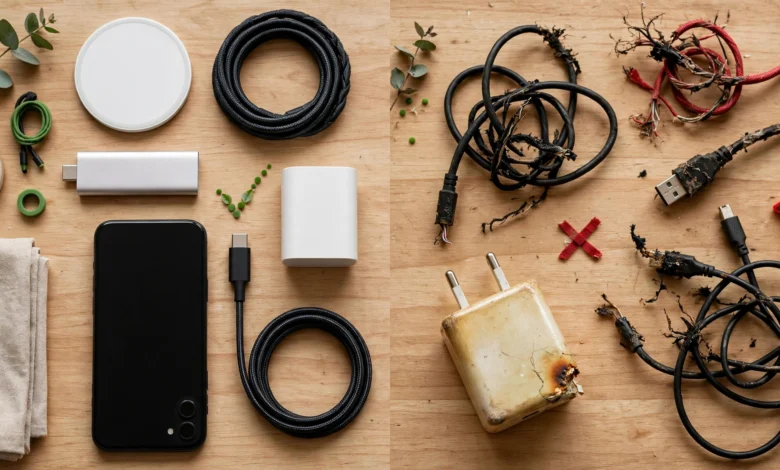
Counterfeits often feel lighter because they leave out the transformer and protective components. Other warning signs include spelling errors, blurry logos, plugs that wobble in the socket, and a price far below the official one.
7. Buy from Trusted Sellers Only
Buy from the phone brand’s own store, official distributors, or well-known retailers with return policies. On marketplaces, buy only from the brand’s official store page. A deal that is half the normal price is not a deal on a device that sits plugged in next to your bed all night.
8. Do Not Ignore the Cable
Use the cable that came with the phone, or a certified replacement from a trusted brand rated for your charger’s wattage. A great charger with a junk cable is still a junk setup.
9. Watch for Warning Signs After You Buy
A safe phone charger may get warm, but it should never be too hot to hold. Stop using it straight away if you notice any of these:
- A burning or plastic smell
- Buzzing or crackling sounds
- Sparks when you plug it in
- Your phone showing slow charging or frequent connect and disconnect alerts
- Discolouration or melting near the pins
Everyday Habits That Protect Your Phone Battery
Choosing well is half the job. How you charge also affects battery health over time.
- Keep it cool. Heat is the biggest enemy of lithium batteries. Do not charge under a pillow, on a bed, or in a hot car.
- Turn on optimised charging. Both iPhone and Android offer settings that hold the battery near 80% overnight and finish just before you wake up.
- Avoid gaming while fast charging. That combines two heat sources at once.
- Use wall sockets in good condition. Loose or burnt sockets cause arcing, which stresses any charger.
- Use surge protection if your area has frequent voltage fluctuations or power cuts.
The Reality Check: Fake Chargers, Smuggling and Scams
Knowing how to choose the right phone charger also means knowing what is out there. The counterfeit charger trade is large, organised and illegal, and the risks land on ordinary buyers.
Real Cases of Counterfeit Charger Seizures
Customs agencies catch fake chargers constantly. A few documented examples:
- Houston, May 2025. US Customs and Border Protection found 373,000 counterfeit Apple-branded charging products in 7,460 cartons at the Port of Houston, with a retail value of just over $7 million. Apple representatives confirmed they were fakes.
- New York and Newark. Officers intercepted 150,000 wall chargers shipped from China that carried counterfeit UL safety marks. CBP warned the shipment could cause serious harm to shoppers and their homes.
- International Falls, Minnesota. In a rail container, officers found 2,956 counterfeit home chargers and more than 1,300 fake phone cases, all bearing a copied luxury brand mark. You can read the official CBP seizure report for details.
- Pittsburgh. CBP seized 588 fake Apple Lightning cables and warned that cheap counterfeit cables can damage phone batteries or the whole phone.
The New York case is worth remembering. Those chargers did not just copy a brand. They faked the safety certification itself. That is why a printed logo alone proves nothing.
What Testing Has Found Inside Fakes
In 2016, UK Trading Standards paid the safety firm UL to test 400 counterfeit Apple chargers bought online from eight countries. Only three passed a basic insulation test meant to protect users from electric shock. That is a failure rate of over 99%.
Around the same time, Apple said in a lawsuit that close to 90% of the “genuine” Apple chargers and cables it bought on Amazon over nine months were actually counterfeit. That case pushed big marketplaces to crack down, but fakes still appear on smaller platforms and social media shops.
When engineers open fakes, they usually find the same shortcuts: tiny or missing transformers, almost no gap between the high-voltage and low-voltage sides, no fuse, and no temperature protection. On a good day, that means poor charging. On a bad day, it means a shock or a fire.
Why This Is an Ethical Issue, Not Just a Legal One
Counterfeiting is a crime because it steals brand names and dodges taxes. But there is a human cost too:
- Safety. A fake charger can hurt someone who never bought it, like a child who touches it or a family asleep in the next room.
- Labour. US customs officials have publicly linked counterfeit goods to forced labour and other criminal networks.
- Fairness. Honest shopkeepers who pay duty and sell real products are undercut by those who do not.
- E-waste. Fakes fail quickly and add to the pile of electronic waste that is often dumped or burned unsafely.
Paying a little more for a real charger is a small, practical way to avoid supporting that chain.
Juice Jacking: Real Risk or Overhyped?
In 2023, the FBI and the US Federal Communications Commission warned travellers to avoid public USB charging stations, saying criminals could use tampered ports or cables to install malware or steal data. This attack is called juice jacking.
To be fair, security experts interviewed by AARP’s report on juice jacking noted that confirmed real-world cases are hard to find, and the FBI itself called its warning a general reminder. It is technically possible, though, and the fix is simple:
- Carry your own charger and plug into a normal wall socket.
- Never use a free cable you find plugged in at a kiosk or receive as a random giveaway.
- If your phone asks whether to trust a device or share data, choose “charge only” or deny it.
- Consider a charge-only cable or USB data blocker for travel.
Conclusion
Knowing how to choose the right phone charger comes down to a few simple checks: find out what wattage and fast-charging standard your phone supports, pick a charger that speaks the same protocol (usually USB-C Power Delivery with PPS, or your brand’s own system), use a properly rated cable, and buy only from official stores or trusted retailers. Your phone controls how much power it takes, so a genuine higher-watt charger is safe, while a cheap fake is not, as customs seizures of hundreds of thousands of counterfeit chargers and safety tests showing over 99% of fakes failing basic insulation checks make clear. Add good habits like charging in a cool place and avoiding unknown public USB ports, and you protect your battery, your data and your home for the price of a few extra rupees or dollars.