Best Gadgets for Remote Work and Home Offices
Home office gadgets that make remote work easier in 2026: monitors, webcams, UPS backup and security keys, plus honest advice on what to skip and why.
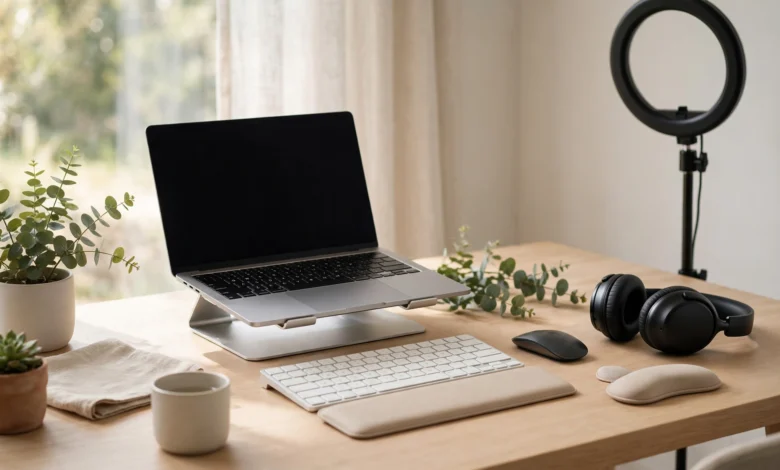
Home Office Gadgets: 12 Best Proven Picks for Remote Work in 2026
Introduction
A good home office isn’t about having the most gadgets. It’s about having the right few that keep you comfortable, connected, and productive for eight hours a day without wrecking your back or your internet connection.
Most people start remote work at the dining table with a laptop and a phone charger. A few months later, the neck pain starts, video calls freeze at the worst moments, and a power cut wipes out an hour of unsaved work. The fix usually isn’t expensive. It’s a handful of well-chosen home office gadgets that solve real problems.
This guide covers the best gadgets for remote work in 2026, grouped by the job they do: comfort and posture, video calls, connectivity, power backup, and security. For each one we explain why it matters, what to look for, and when you can skip it.
We also look at the side most gadget lists ignore. Some “remote work hacks” have cost people their jobs, like the bank employees fired for faking keyboard activity. Some home setups have been used for serious fraud, like the laptop farm that helped North Korean workers land jobs at more than 300 US companies. And some smart cameras exposed the very homes they were meant to protect.
By the end, you’ll know how to build a home office setup that works hard, stays secure, and keeps you on the right side of your employer and the law.
Plan Your Home Office Setup Before You Buy Anything
The smartest home office purchases start with a list of problems, not a shopping cart. Spend ten minutes answering these questions first, and you’ll avoid buying gadgets that end up in a drawer.
- Where does it hurt? Neck, wrists, lower back, or eyes. Pain points tell you which ergonomic gadgets to buy first.
- What breaks your workday? Dropped video calls, slow Wi-Fi in one room, a laptop battery that dies, or power cuts.
- How much of your day is on calls? If it’s more than two hours, a good headset and webcam move to the top of the list.
- Does your employer provide equipment? Many companies give a monitor, headset, or home office allowance. Ask before spending your own money, and check what the company laptop allows you to plug in.
- How much space do you have? A corner of the bedroom needs compact, multi-purpose gear. A dedicated room can take a full desk setup.
A useful rule: fix comfort first, then connectivity, then everything else. A fancy webcam won’t help if your back hurts by noon or your Wi-Fi drops every hour.
The 12 Best Home Office Gadgets for Remote Work
These are the gadgets that make the biggest difference in a real home office, grouped by the problem they solve. You don’t need all twelve. Pick the ones that fix your own pain points.
Comfort and Ergonomics: The Foundation of a Healthy Home Office
Poor posture is the most common and most ignored home office problem. These four gadgets fix most of it.


1. External Monitor
A laptop screen forces you to look down for hours, which strains your neck. A 24 to 27 inch external monitor at eye level is the single biggest upgrade for most remote workers. It also gives you room for two windows side by side, which speeds up almost any job.
- Look for: 1080p at 24 inches or 1440p at 27 inches, a height-adjustable stand, and a USB-C input if your laptop supports it
- Skip it if: you work fewer than two hours a day on a computer
2. Laptop Stand
If a monitor isn’t in the budget, a laptop stand is the cheapest ergonomic home office fix. It raises the screen to eye level so you stop hunching. Pair it with an external keyboard and mouse, since typing on a raised laptop is awkward.
3. Ergonomic Keyboard and Mouse
Wrist pain builds slowly and lasts a long time. A full-size keyboard with a slight tilt and a mouse that fits your hand make long typing days far easier. Vertical mice help many people with wrist strain. Wireless sets keep your desk tidy.
4. Height-Adjustable Desk or Desk Converter
Sitting all day is hard on your back and circulation. A sit-stand desk lets you switch positions through the day. A desk converter, which sits on top of an existing table, gives most of the benefit at a lower price and suits smaller home office spaces.
Video Calls: Look and Sound Professional
For many remote workers, calls are where colleagues and clients judge you. These three gadgets make the biggest difference.
5. Webcam With a Privacy Shutter
Built-in laptop cameras are often grainy and sit at an unflattering angle. A 1080p external webcam mounted on your monitor fixes both. Choose one with a physical privacy shutter, so you know for certain when the camera can’t see you.
6. Noise-Cancelling Headset or Earbuds With a Good Mic
Your voice matters more than your video. A headset with a boom microphone or earbuds with strong call noise reduction keeps background noise like traffic, fans, and family out of your meetings. Active noise cancellation also helps you focus in a busy home.
7. Desk Light or Key Light
A window behind you turns you into a silhouette on camera. A simple LED desk light or small key light in front of you fixes this. It also reduces eye strain during late work sessions.
Connectivity: Keep Your Home Office Online
Slow or patchy internet is the most frustrating remote work problem, and it’s often fixable at home.
8. Wi-Fi 6 or Mesh Wi-Fi Router
The free router from your internet provider is usually the weakest link. A Wi-Fi 6 router, or a mesh Wi-Fi system for larger homes, gives a stronger, more stable signal in the room where you actually work. If your desk is near the router, a simple Ethernet cable is even better.
9. USB-C Docking Station or Hub
A USB-C docking station connects your monitor, keyboard, mouse, Ethernet, and charger through a single cable. Plug in once in the morning and your whole home office is ready. Check that it supports your laptop’s display output and charging wattage before buying.
Power: Protect Your Work From Outages and Surges
Power problems are easy to forget until they cost you a deadline.
10. UPS for Your Router and Computer
In places with regular power cuts, including much of Pakistan during load-shedding, a small UPS (uninterruptible power supply) for your router keeps you online through short outages. A larger UPS for a desktop gives you time to save work and shut down safely. Many remote workers in Pakistan use a dedicated router UPS so calls don’t drop when the lights go out.
11. Surge Protector and a Quality GaN Charger
Voltage spikes can damage expensive equipment. A proper surge protector power strip protects everything on your desk. A compact GaN charger can power a laptop, phone, and earbuds from one plug. Buy both from known brands, since counterfeit chargers are a real fire risk.
Security: Protect Your Data and Your Job
A home office is a target for hackers because home networks are usually less protected than office ones.
12. Hardware Security Key
A hardware security key is a small USB or NFC device that adds a physical step to logging in. Even if someone steals your password, they can’t get into your accounts without the key. Many major services support them, and some employers now issue them to remote staff. Pair it with a password manager and keep your router’s firmware updated.
Home Office Essentials by Priority: Quick Reference
If you’re building a home office on a budget, buy in this order. Each tier fixes the biggest remaining problem.
| Priority | Gadget | Problem it solves | Cost level |
|---|---|---|---|
| Buy first | Laptop stand plus keyboard and mouse | Neck and wrist pain | Low |
| Buy first | UPS for router (if you face power cuts) | Dropped calls during outages | Low |
| Buy first | Headset or earbuds with good mic | Poor call audio | Low to medium |
| Buy next | External monitor | Neck strain, limited screen space | Medium |
| Buy next | Wi-Fi 6 or mesh router | Weak or unstable connection | Medium |
| Buy next | Surge protector and GaN charger | Equipment damage, cable clutter | Low |
| Upgrade | Webcam with privacy shutter | Grainy video, privacy worries | Low to medium |
| Upgrade | Desk light or key light | Dark video, eye strain | Low |
| Upgrade | USB-C docking station | Daily cable hassle | Medium |
| Upgrade | Hardware security key | Account takeover risk | Low |
| Long term | Sit-stand desk or converter | Back pain from sitting all day | Medium to high |
Cost levels are relative, since prices differ a lot by country and brand. Always check whether your employer covers any of these as part of a home office allowance.
The Reality Check: When Home Office Gadgets Cross the Line
Most home office gadgets are harmless tools. But remote work has also produced real firings, fraud convictions, and privacy scandals. These cases show where the lines are, and why they matter for your own setup.
Case 1: Fired for Faking Work With “Mouse Jigglers”
In May 2024, Wells Fargo fired more than a dozen employees in its wealth and investment management unit. Disclosures filed with the US Financial Industry Regulatory Authority said they were “discharged after review of allegations involving simulation of keyboard activity creating impression of active work,” as Financial Planning reported.
Devices and apps called mouse jigglers or mouse movers became popular during the pandemic, with tips shared widely on Reddit and TikTok. They’re cheap and easy to buy, which makes them tempting.
The lesson: a gadget that fakes activity isn’t a productivity tool. It’s a way of misleading your employer, and in regulated industries it can end a career. If your employer measures activity in ways that feel unfair, raise it openly rather than gaming it.
Case 2: The Laptop Farm That Funded North Korea
In July 2025, Christina Chapman of Arizona was sentenced to 102 months in prison for running a “laptop farm” from her home. She hosted company laptops so that North Korean IT workers, using stolen American identities, could pose as US-based remote employees. The scheme defrauded 309 US businesses and generated more than $17 million, much of it sent to North Korea. Police seized more than 90 laptops from her home, according to The Register.
The lesson: never accept, host, or forward a work laptop for someone else, and never let anyone else use your work device or login. If a “job offer” asks you to receive company equipment on someone’s behalf, it’s a red flag for exactly this kind of fraud.
Case 3: When Home Cameras Watched the Wrong People
In 2023, Amazon’s Ring agreed to pay $5.8 million to settle Federal Trade Commission claims that employees and contractors had broad access to customers’ private videos. The FTC said one employee viewed thousands of recordings from at least 81 female customers in 2017, and that weak security let hackers take over some customers’ cameras, as TechCrunch reported. Ring disputed the allegations and denied breaking the law.
The lesson: any camera in your home office, whether a webcam or a smart security camera, is a potential window into your private life. Use physical shutters, turn on two-factor login and end-to-end encryption where available, and buy from brands with a strong security record.
Case 4: Counterfeit Chargers in the Supply Chain
Cheap chargers and power accessories are some of the most commonly faked electronics. In one three-month operation, Hong Kong Customs seized about 3,900 suspected counterfeit portable chargers and arrested 49 people. Tests found the fakes delivered less output than claimed, and some risked overheating and short circuits.
The lesson: your home office runs all day, often unattended. Buy chargers, power strips, and UPS units from known brands and authorised sellers, not the cheapest listing you can find.
How to Build a Safe and Ethical Home Office
A safe home office comes down to three habits: buying genuine gear, protecting company data, and being honest about how you work.
Buy Genuine Gadgets
- Buy from authorised sellers. Brand stores and established retailers cost a little more but give you real warranties and safe products.
- Be suspicious of big discounts. A branded docking station or webcam at a third of the usual price is almost always fake or refurbished.
- Check serial numbers. Most major brands let you verify a serial number or register the product on their website.
- Inspect power gear closely. Chargers, power strips, and UPS units should feel solid, carry clear safety marks, and list proper input and output ratings.
Protect Company and Personal Data
- Separate work and personal devices. Don’t use your work laptop for personal browsing, and don’t let family members use it.
- Secure your router. Change the default admin password, use WPA3 or WPA2 encryption, and update the firmware.
- Use two-factor authentication everywhere, ideally with a hardware security key.
- Lock your screen whenever you step away, even at home.
- Cover or unplug cameras when you’re not on a call.
Stay Honest About How You Work
Remote work runs on trust. Tools that fake activity, share logins, or hide where you’re working break that trust, and the cases above show the consequences can be serious. If you need flexibility, ask for it directly. Most employers would rather adjust expectations than discover a mouse jiggler on your desk.
Frequently Asked Questions About Home Office Gadgets
What is the most important gadget for a home office?
For most people, it’s an external monitor or a laptop stand with a separate keyboard and mouse. Fixing your posture pays off every single working day.
What home office gadgets do I need on a small budget?
Start with a laptop stand, an external keyboard and mouse, and a headset with a good microphone. If you face power cuts, add a small UPS for your router. These cost little and solve the most common problems.
Is it illegal to use a mouse jiggler?
Owning one isn’t illegal. Using one to fake activity can break your employment contract or company policy, and in regulated industries it can be treated as misconduct, as the Wells Fargo firings showed.
Do I need a webcam if my laptop has one?
Not always. If your built-in camera looks fine and sits at a reasonable angle, keep using it. An external webcam is worth it if you’re on camera often or your laptop camera is poor.
How do I keep my home office secure?
Use a strong router password with current encryption, turn on two-factor authentication, keep work and personal devices separate, and cover cameras when not in use.
Conclusion
The best home office isn’t the one with the most gadgets but the one built around your real problems, so start with comfort through a monitor or laptop stand, an ergonomic keyboard and mouse, and eventually a sit-stand desk, then fix video calls with a good headset, a webcam with a privacy shutter, and better lighting, keep yourself online with a Wi-Fi 6 or mesh router, a USB-C dock, and a UPS for power cuts, and protect your work with a surge protector, genuine chargers, and a hardware security key; just as important, stay on the right side of the line, because the Wells Fargo employees fired for faking keyboard activity, the Arizona laptop farm that helped North Korean workers defraud 309 companies, and the Ring privacy settlement all show that the tools in a home office can be misused or turned against you, so buy genuine gear, protect your data, and keep your remote work honest.