Top Smart Home Gadgets Worth Trying in Pakistan
Smart home gadgets worth buying in Pakistan in 2026, from smart plugs and Wi-Fi cameras to UPS-friendly setups, with honest prices and privacy tips.ma
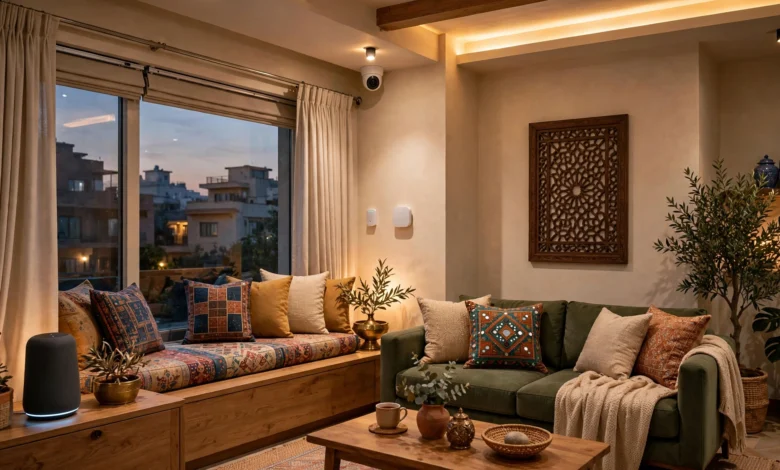
Smart Home Gadgets in Pakistan: 10 Best Proven Picks Worth Buying in 2026
Introduction
A smart home in Pakistan no longer means spending lakhs on a custom installation. Today, a Rs 4,000 smart plug can switch off a forgotten iron from the office, a Wi-Fi camera can show you who’s at the gate, and a small IR remote can turn on the AC before you reach home in July.
But Pakistan isn’t Silicon Valley, and most online lists forget that. Load-shedding knocks devices offline. Voltage swings kill cheap electronics. Many gadgets only work on 2.4GHz Wi-Fi, and voice assistants still struggle with Urdu. The best smart home gadgets in Pakistan are the ones built for these conditions, not just the ones with the flashiest ads.
This guide covers ten smart home devices worth trying in 2026, from smart plugs and cameras to switches, locks, and robot vacuums. For each one we explain what it does, what it costs, and the local realities to plan for.
We also cover the side that rarely makes it into product roundups. A single hacker once accessed live feeds from more than 150,000 security cameras. Hijacked home devices have been used to knock major websites offline. And employees at one camera company were accused of watching customers’ private videos. In Pakistan, misusing cameras or someone’s images can also bring charges under the cybercrime law.
By the end, you’ll know which smart home gadgets are worth your money and how to set them up so they protect your family instead of exposing it.
What to Know Before Building a Smart Home in Pakistan
A smart home that works in Pakistan needs to survive power cuts, patchy internet, and voltage swings. Check these five things before you buy anything.
1. Plan for Load-Shedding
Most smart home devices depend on Wi-Fi. When the power goes, your router goes too, and every camera, plug, and switch goes offline. A small router UPS, or connecting your router to your home’s UPS or solar inverter, keeps the whole system running through outages. Also check how each device behaves when power returns: some smart plugs remember their last state, others switch off.
2. Check Your Wi-Fi Band and Coverage
Many smart plugs, bulbs, and cameras only support 2.4GHz Wi-Fi. Most Pakistani routers broadcast both 2.4GHz and 5GHz, but some combine them under one name, which can confuse setup. Also check signal strength at the gate, garage, or rooftop before buying outdoor cameras.
3. Protect Against Voltage Swings
Voltage fluctuations are common in many areas. Plug smart devices into a surge-protected strip, and never use a small smart plug for heavy appliances like ACs, geysers, or irons unless its load rating clearly supports them.


4. Pick One App Ecosystem
Xiaomi devices use the Xiaomi Home app, TP-Link uses Tapo, EZVIZ and Imou have their own apps. Mixing too many brands means juggling too many apps. Choose one or two ecosystems and stick with them, or check that devices work with Google Home for central control.
5. Buy Officially Imported, Warranty-Backed Products
Wireless devices sold in Pakistan should come through proper import channels with local warranty. Grey-market or smuggled units may have no warranty, may be region-locked in their apps, and may not receive security updates. For a smart home, missing security updates are a real risk, not a minor inconvenience.
Best Smart Home Gadgets in Pakistan: Quick Comparison
A smart plug and an indoor Wi-Fi camera are the best first steps for most Pakistani homes. Here are all ten picks at a glance.
| # | Smart home gadget | Best for | Example brands | Price in Pakistan (PKR) |
|---|---|---|---|---|
| 1 | Smart plug with energy monitoring | Scheduling, remote off, tracking usage | EZVIZ T30, TP-Link Tapo | About 4,200 |
| 2 | Indoor Wi-Fi camera | Watching kids, elders, pets | Xiaomi C300, Imou, Tapo | About 6,000 to 18,000 |
| 3 | Outdoor Wi-Fi camera | Gate, driveway, rooftop | EZVIZ, Imou | About 11,000 to 14,000 |
| 4 | Smart IR remote (IR blaster) | Controlling ACs and TVs from your phone | Xiaomi, Broadlink | Varies, budget-friendly |
| 5 | Smart bulbs and LED strips | Lighting schedules, mood lighting | Xiaomi, Philips WiZ | Varies |
| 6 | Smart wall switches | Whole-room control without new appliances | Local brands like Danecore, Mux | Up to about 13,200 |
| 7 | Smart door lock | Fingerprint or PIN entry | Various | Varies widely |
| 8 | Video doorbell | Seeing visitors at the gate | EZVIZ, Imou, Tapo | Varies, limited stock |
| 9 | Smart speaker or display | Voice control, routines | Google Nest | Varies, mostly imported |
| 10 | Robot vacuum | Daily dust control | Xiaomi, Roborock | Varies widely |
Prices from W11Stop and Qeemat listings and retailer guides, checked in 2026. Ranges marked “about” are approximate, and categories marked “varies” depend heavily on model and seller, so compare current listings before buying.
10 Smart Home Gadgets Worth Trying in Pakistan
These ten smart home devices are grouped by how useful they are in a typical Pakistani home. Start at the top and add more only when you need them.
1. Smart Plug With Energy Monitoring
A smart plug is the cheapest way to start a smart home. Plug a lamp, fan, router, or water cooler into it, and you can switch it on or off from your phone, set schedules, or use a timer. The EZVIZ T30 sells for about Rs 4,200 and shows real-time power use, which helps you spot appliances that quietly push up your electricity bill.
- Great for: night lights, water motors on a timer, routers that need a remote restart
- Watch out: check the load rating. Don’t run ACs, geysers, or heaters through a small plug unless it’s rated for them
2. Indoor Wi-Fi Camera
An indoor Wi-Fi security camera lets you check on children, elderly parents, or pets from anywhere. Models like the Xiaomi Smart Camera C300 offer pan and tilt, night vision, and human detection. The dual-lens C300 Dual sells for about Rs 17,999, while simpler indoor cameras from Imou and Tapo start much lower.
Use a microSD card for local recording so footage isn’t lost during internet outages. And respect privacy: inform household members and domestic staff that a camera is in use, and never place one in bedrooms or bathrooms of others.
3. Outdoor Wi-Fi Camera
An outdoor camera at the gate or driveway is one of the most practical smart home upgrades in Pakistani cities. Look for IP66 or higher weather protection, colour night vision, and a strong Wi-Fi signal where you mount it. Outdoor models like the EZVIZ C3W are commonly listed around Rs 11,000 to Rs 14,000.
Point cameras at your own property. Recording a neighbour’s windows or courtyard invades their privacy and can cause legal trouble.
4. Smart IR Remote (IR Blaster)
This is one of the most underrated smart home gadgets in Pakistan. An IR blaster learns the signals from your existing remotes, so you can control ACs, TVs, and other infrared appliances from your phone. Turn the AC on 15 minutes before you get home, set it to switch off at 3am, or control it by voice. It works with the appliances you already own.
5. Smart Bulbs and LED Strips
Smart bulbs let you schedule lights, dim them, or change colours from your phone. They’re useful for security too: lights that switch on in the evening make an empty house look occupied. Just remember that a smart bulb needs power at the switch, so family members must leave the wall switch on.
6. Smart Wall Switches
For whole-room control, smart wall switches replace your existing switchboards and work with ordinary fans and lights. Local brands such as Danecore and Mux sell them, with prices listed up to about Rs 13,200. Installation needs a qualified electrician, and some models need a neutral wire, which older Pakistani homes may not have at the switchboard.
7. Smart Door Lock
Fingerprint and PIN locks remove the need to hand out keys to drivers, cooks, or relatives. Choose one with a mechanical key backup and a battery warning, and check that the installer is trustworthy, since they handle your home’s security directly.
8. Video Doorbell
A video doorbell shows who’s at the gate on your phone and lets you talk to them. It’s useful for deliveries and unexpected visitors. Availability is limited in Pakistan, and many homes have gates far from the router, so check Wi-Fi reach and power options before buying.
9. Smart Speaker or Display
Google Nest speakers can control lights, plugs, and routines by voice. Be realistic, though: official availability in Pakistan is limited, many units are imported, and local language support is weaker than for English. They work best for English-speaking households who already use several Google Home-compatible devices.
10. Robot Vacuum
Dust is a daily fight in most Pakistani cities, and a robot vacuum keeps floors cleaner between full cleanings. Brands like Xiaomi and Roborock offer models with app control and mapping. Prices vary widely. Remember that mapping robots carry cameras or sensors that map your home, so choose a reputable brand and review its privacy settings.
The Reality Check: When Smart Home Devices Go Wrong
Every camera, plug, and speaker in a smart home is a small computer connected to the internet. That brings convenience, but it also brings risk. These real cases show what can happen, and what each one teaches Pakistani buyers.
Case 1: 150,000 Security Cameras Exposed in One Hack
In March 2021, hackers accessed live feeds from more than 150,000 cameras run by US security company Verkada, including cameras in hospitals, prisons, schools, and Tesla facilities. They reportedly used “super admin” login details found on a system the company had left exposed to the internet. Swiss hacker Tillie Kottmann, who claimed credit for the breach, was indicted in the US on charges including conspiracy, wire fraud, and aggravated identity theft, as BankInfoSecurity reported.
The lesson: your camera is only as safe as the company running its cloud service. Choose established brands that publish security updates, and avoid no-name cameras with unknown apps and servers.
Case 2: Home Devices Hijacked to Attack the Internet
In 2016, the Mirai botnet infected hundreds of thousands of internet-connected cameras, routers, and video recorders, mostly by logging in with factory default passwords. The hijacked devices were used in massive attacks, including one in October 2016 that disrupted major websites across the US. Three young men who created Mirai later pleaded guilty in US federal court.
The lesson: a smart home device with its default password is an open door. Change every default password, and replace devices that no longer receive updates.
Case 3: Employees Watching Customers’ Videos
In 2023, Amazon’s Ring agreed to pay $5.8 million to settle US Federal Trade Commission claims that employees and contractors had broad access to customers’ private videos. The FTC said one employee viewed thousands of recordings from at least 81 female customers, and that weak security let hackers take over some cameras, as TechCrunch reported. Ring denied breaking the law.
The lesson: indoor cameras capture the most private parts of family life. Prefer brands that offer end-to-end encryption, use two-factor login, and don’t place cameras in bedrooms or bathrooms.
Case 4: The Law in Pakistan
Pakistan’s Prevention of Electronic Crimes Act (PECA) 2016 makes unauthorised access to information systems and data a crime, and it also covers misuse of a person’s photos or videos without consent, including sharing intimate images or using recordings to harass someone. That cuts both ways for smart home owners:
- If someone hacks your camera or misuses your footage, the FIA’s cybercrime wing is the body to report it to.
- If you install hidden cameras to record others without their knowledge, or share footage of people to embarrass or harass them, you may be the one facing charges.
The ethical rule is simple: use cameras to protect your home, not to spy on people.
Smuggled and Fake Smart Devices
Pakistan Customs regularly seizes smuggled electronics at airports and borders. For smart home gear, grey-market and fake products carry extra risks beyond missing warranty: region-locked apps, no firmware updates, and cheap cloud servers with unknown security. A camera that never gets updated is exactly the kind of device Mirai turned into a weapon.
How to Secure Your Smart Home: A Simple Checklist
A secure smart home doesn’t need technical expertise. Follow these steps when you set up each device, and repeat the key ones every few months.
- Change default passwords immediately. This includes your router, cameras, and any device with its own login. Use a different strong password for each.
- Turn on two-factor authentication in every app that offers it, especially camera and door lock apps.
- Update firmware regularly. Enable automatic updates where possible. If a device no longer gets updates, plan to replace it.
- Secure your router. Use WPA2 or WPA3 encryption, change the admin password, and turn off WPS and remote management unless you need them.
- Create a separate guest network for smart devices if your router supports it, so a hacked plug can’t reach your laptop or phone.
- Use local storage where possible. A microSD card in your camera keeps footage at home and records during internet outages.
- Limit who has app access. Share camera access only with family members who need it, and remove anyone who no longer should have it, such as former staff.
- Place cameras responsibly. Cover entrances and shared areas, never private rooms, and let household members and domestic workers know cameras are in use.
- Buy from authorised sellers. Genuine, officially imported devices get warranty support and security updates. Smuggled or fake ones often don’t.
- Keep a power backup for your network. A router UPS keeps cameras and alarms online during load-shedding, so your security setup doesn’t go dark when the lights do.
Frequently Asked Questions About Smart Home Gadgets in Pakistan
What is the best smart home gadget to start with in Pakistan?
A smart plug is the easiest and cheapest start, at around Rs 4,200 for an energy-monitoring model. An indoor Wi-Fi camera is the next most useful step for most families.
Do smart home devices work during load-shedding?
Only if your router and the devices have power. Connect your router to a UPS or solar inverter, and use cameras with microSD recording so you don’t lose footage during outages.
Is it legal to install security cameras at home in Pakistan?
Yes, for protecting your own property. But recording people without consent in private spaces, or sharing footage to harass or embarrass someone, can lead to charges under PECA 2016. Point cameras at your own property and tell household members and staff where they are.
Do smart home devices need 5GHz Wi-Fi?
Most don’t. Many smart plugs, bulbs, and cameras only work on 2.4GHz, which also reaches further through walls. Make sure your router’s 2.4GHz band is turned on.
Are cheap unbranded smart cameras safe?
Often not. They may use weak default passwords, unknown cloud servers, and rarely get updates. Spending a little more on an established brand gives you better security and a real warranty.
Conclusion
Building a smart home in Pakistan works best when you start small and plan for local realities: begin with a smart plug like the Rs 4,200 EZVIZ T30 and an indoor Wi-Fi camera, then add an outdoor camera, an IR blaster for your ACs, smart lights or switches, and later a smart lock, video doorbell, smart speaker, or robot vacuum, while keeping your router on a UPS for load-shedding, using 2.4GHz Wi-Fi, and protecting devices from voltage swings; just as important is security and ethics, because the Verkada hack that exposed 150,000 cameras, the Mirai botnet built from devices with default passwords, and the Ring privacy settlement all show how connected gadgets can be turned against their owners, and Pakistan’s PECA 2016 law means cameras must protect your home rather than spy on others, so buy genuine, officially imported smart home gadgets in Pakistan, change every default password, keep firmware updated, and place cameras with respect for everyone’s privacy.