Best Smartphone Accessories You Should Buy Along With Your Phone
Buying a new phone? Here are the smartphone accessories worth buying, from chargers to cases, plus how to avoid counterfeit gear that can hurt you.
Smartphone Accessories: 9 Best Essentials to Buy With Your New Phone
Introduction
Smartphone accessories can make or break your first year with a new phone. You spend weeks comparing cameras and battery life, hand over a serious amount of money, and then walk out of the store with a phone that has no case, no charger in the box, and a glass back that cracks if you look at it wrong. Most people fix this by grabbing whatever cheap add-ons show up first in a search. That is where things go sideways.
The accessory market is huge, and a lot of it is not what it claims to be. In 2016, Apple said in a federal lawsuit that nearly 90% of the “genuine” chargers and cables it bought on Amazon were fakes. A few weeks later, UK safety investigators tested 400 counterfeit iPhone chargers and only three passed a basic shock test. US customs officers still seize fake earbuds by the tens of thousands.
So this guide does two things. It walks through the best smartphone accessories to buy with a new phone, from a phone case and screen protector to a fast charger and power bank, and explains what each one actually does for you. It also shows you how to spot counterfeit chargers, why certifications matter, and which risks are real versus overhyped. The goal is simple: spend a sensible amount, protect your phone, and keep yourself safe.
Why Smartphone Accessories Matter More Than Most People Think
A modern phone is basically a small computer with a lithium battery inside, and the smartphone accessories you plug into it touch that battery, its charging circuit and your data. A good charger feeds power at the right voltage and stops when it should. A bad one can overheat, damage the battery, or in rare cases start a fire. A decent case absorbs a drop that would otherwise cost you a screen repair. The gap between “works fine” and “quietly dangerous” is often invisible from the outside.
That is why choosing smartphone accessories deserves a little thought. Price is not the only signal, but it is a strong one. When something branded as genuine costs a fraction of the real thing, there is usually a reason.
The Counterfeit Problem: Real Cases, Not Scare Stories
Counterfeit phone accessories are not a rumor. They have been the subject of lawsuits, government testing and large customs seizures. A few examples worth knowing:
- The Mobile Star lawsuit (2016). Apple sued Mobile Star, a supplier to Amazon, in federal court in California. Apple said it had bought more than 100 Apple-branded chargers, cables and devices sold through Amazon and found almost 90% of them were counterfeit. The complaint warned that these fakes could overheat, catch fire or deliver a dangerous electric shock. Apple asked for up to $2 million per counterfeit mark.
- The 400-charger safety test (2016). The UK’s Chartered Trading Standards Institute commissioned UL to test 400 counterfeit iPhone chargers bought online from eight countries, including the US, China and Australia. Only 3 passed a basic electric strength test. UL later told a US Senate committee that 12 of them were built so badly they posed a risk of lethal electrocution.
- Customs seizures of fake earbuds. In May 2021, US Customs and Border Protection officers in Cincinnati seized three shipments holding 36,000 fake AirPods, worth an estimated $7.16 million if genuine. You can read the details in the official CBP seizure report on counterfeit AirPods. In a separate Louisville seizure, a CBP official warned that some counterfeit electronics from China had been found carrying malware.
These cases point to the same lesson. Selling fake smartphone accessories is illegal because it breaks trademark law, but the bigger problem for you is that the fakes skip the safety testing real products go through. The person who pays for that shortcut is the buyer.
What This Means When You Shop
You do not need to be paranoid. Most accessories from known brands, sold by authorized retailers, are fine. The risk sits mainly with listings that claim to be an official brand product at a suspiciously low price, or with no-name chargers that carry no safety marks at all. Keep that in mind as you go through the list below.
9 Best Smartphone Accessories to Buy With Your New Phone
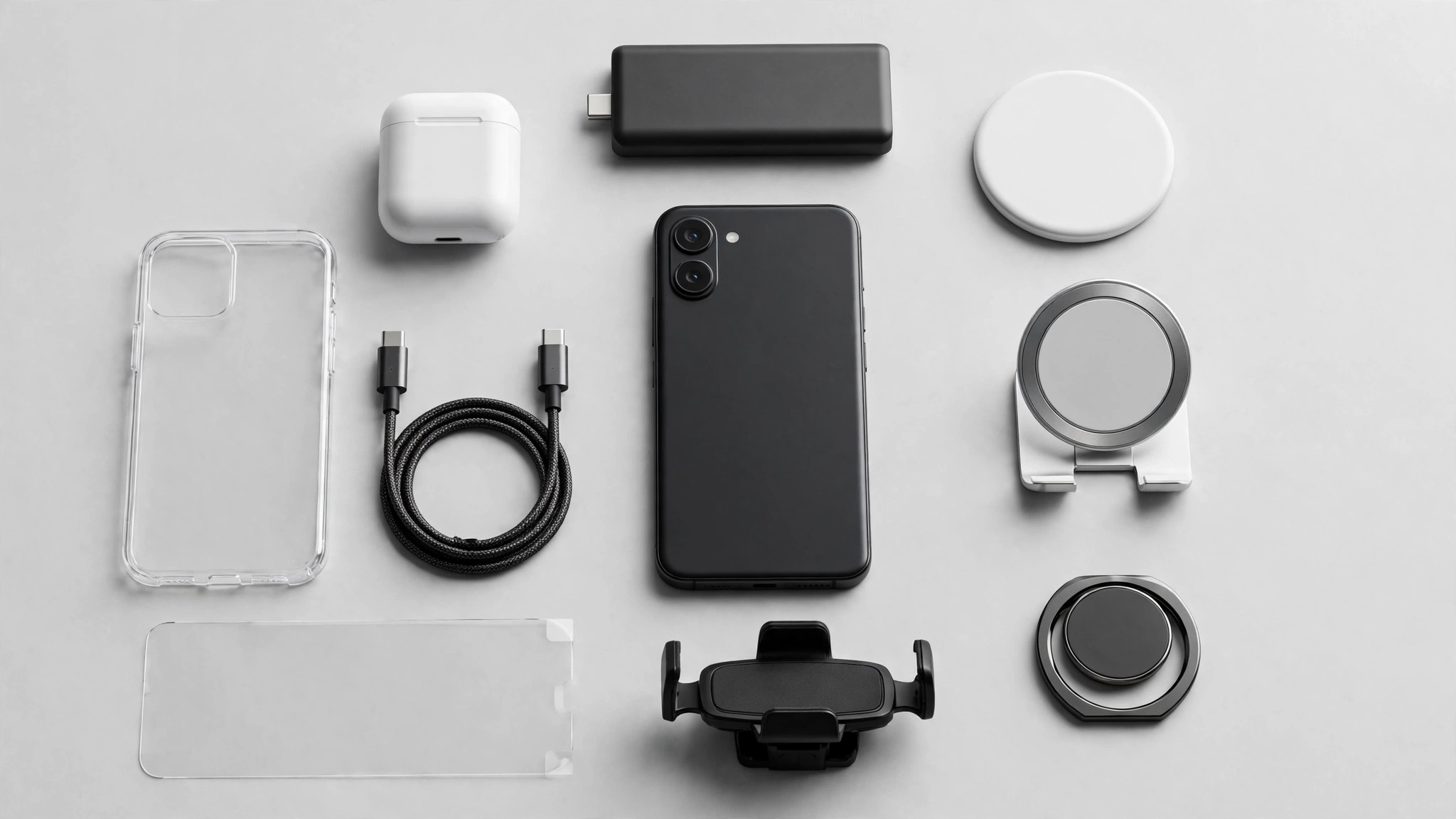
These are the smartphone accessories that earn their place on day one. They are listed roughly in order of priority, so if your budget is tight, start at the top.
1. A Protective Phone Case
A phone case is the single most useful purchase you can make. Phones today use glass on both sides, and a back-glass replacement on a flagship can cost more than a mid-range phone. A good case pays for itself the first time you drop it.
What to look for:
- Raised edges around the screen and camera bump, so the glass does not hit the ground first
- Reinforced corners, since most drops land on a corner
- A grippy material like TPU or textured silicone, which makes drops less likely in the first place
- MagSafe or Qi2 magnets if you plan to use magnetic chargers or mounts
You do not need a rugged brick unless you work outdoors. A slim case from a known brand like Spigen, OtterBox, or the phone maker itself is enough for most people.
2. A Tempered Glass Screen Protector
A screen protector is cheap insurance. Tempered glass protectors cost a few dollars, take the scratches and small impacts, and can be swapped out when they crack. A cracked protector is annoying. A cracked display is expensive.
Pick one that matches your exact phone model, has proper cutouts for the front camera and sensors, and comes with an alignment frame. If your phone has an in-display fingerprint reader, check that the protector is listed as compatible, because some thick or cheap ones block it.
3. A Certified Fast Charger
Most new phones no longer ship with a power adapter, so a fast charger is often a must rather than a nice-to-have. This is also the accessory where cutting corners carries the most risk, given the test results above.
How to choose a safe USB-C charger:
- Match the charging standard. iPhones and most Android phones use USB Power Delivery (PD). Samsung phones also use PPS for their top speeds.
- Check the wattage. 20W to 30W covers most phones. Higher numbers only help if your phone supports them.
- Look for safety marks such as UL, ETL, CE or your local equivalent, printed on the charger itself, not just the box.
- Buy from the phone maker or an established brand like Anker, Belkin or Ugreen, through an authorized seller.
A real charger from a trusted brand costs more than a no-name cube. That difference is what pays for insulation, temperature protection and testing.
4. A Quality Charging Cable
Cables fail more than anything else in your kit, so having a spare or two is smart. A good charging cable should be rated for the wattage you use and built with reinforced ends where it bends.
For iPhones that still use Lightning, look for Apple’s MFi certified label (Made for iPhone). For USB-C, look for USB-IF certification from reputable brands. Cheap uncertified cables can charge slowly, fail early, or in poor cases damage the port. Braided cables are a nice bonus if you are rough on your gear.
5. A Reliable Power Bank
A power bank is one of the most practical smartphone accessories for anyone who travels, commutes or uses their phone heavily. A 10,000mAh model will recharge most phones about twice and still fit in a jacket pocket.
Things to check:
- USB-C PD output so it charges your phone at full speed
- Pass-through charging if you want to charge the bank and phone together
- Airline rules: most airlines only allow power banks in carry-on bags, and batteries above 100Wh need approval, so a 10,000 to 20,000mAh bank is the sweet spot
- A known brand, because a lithium battery pack is the last place you want a counterfeit
A power bank also solves the public charging question, which we cover below.
6. A Wireless Charger or Charging Stand
A wireless charger is more about convenience than speed. Drop the phone on a pad or stand at your desk or bedside and it tops up without fiddling with cables, which also saves wear on the charging port.
If your phone supports MagSafe or Qi2 wireless charging, a magnetic stand lines up perfectly every time and charges faster than older Qi pads. Again, stick to certified products. A wireless charger that runs hot every night is not something you want under your pillow.
7. Wireless Earbuds
Most phones dropped the headphone jack years ago, so wireless earbuds have become a standard part of the setup. Earbuds from your phone’s own brand often add extras like automatic switching, better codecs or easy pairing, but good third-party options from Sony, Jabra or Anker’s Soundcore line work with any phone.
This is also the category counterfeiters love. Fake AirPods and Galaxy Buds often look nearly identical in photos, and as the customs seizures above show, they move in huge volumes. If a “genuine” pair is selling at a third of the retail price, it is almost certainly not genuine.
8. A Car Mount and Car Charger
If you drive, a car mount is a safety accessory, not a gadget. Holding a phone for navigation is distracting and illegal in many places. A vent, dashboard or windshield mount keeps the screen in view and your hands on the wheel.
Pair it with a car charger that supports USB-C PD. Magnetic mounts with built-in charging are convenient if your phone has MagSafe or Qi2. Check local laws on windshield mounts before you buy, since some regions restrict them.
9. A Charge-Only Cable or USB Data Blocker
This one is cheap and often overlooked. A charge-only cable or a small USB data blocker lets power through but cuts the data lines, so a USB port can charge your phone but cannot talk to it.
The reason people buy these is juice jacking, the idea that a tampered public USB port could push malware onto your phone or pull data off it. The FBI’s Denver office and the FCC both warned about it in 2023, and the FCC’s tips to avoid juice jacking recommend using a wall outlet, carrying your own cables, and using charge-only cables. To keep things honest, the FCC has also said it is not aware of any confirmed cases, and modern phones ask for permission before sharing data over USB. So treat this as cheap peace of mind, not a reason to panic. Carrying your own power bank solves the problem entirely.
How to Buy Smartphone Accessories Safely and Spot Fakes
Knowing which smartphone accessories to buy is half the job. The other half is making sure what arrives is real and safe. Counterfeiters are good at product photos, so you need to look at the seller and the product itself, not just the listing.
Red Flags of Counterfeit Smartphone Accessories
Watch for these warning signs:
- The price is too good. A “genuine” brand charger or earbuds at 50% to 70% off retail from an unknown seller is the biggest giveaway.
- Missing or odd safety marks. Real chargers print certification marks clearly on the body. In the UL testing, many fakes carried copied UL marks, so a mark alone is not proof, but no mark at all is a clear warning.
- Weight and feel. Fake chargers often feel noticeably light because they skip internal components. Real ones have some heft.
- Sloppy printing and packaging. Spelling errors, blurry logos, uneven seams and flimsy boxes are common tells.
- Seller history. New sellers with few reviews, no contact address and a stock of “official” products at low prices deserve suspicion.
- Heat and smell. If a charger gets very hot, buzzes, or smells of burning plastic, unplug it and stop using it.
Where to Buy Smartphone Accessories You Can Trust
The safest sources are simple:
- The phone maker’s own store or website
- Authorized retailers and carrier stores
- The official brand store of a known accessory maker, rather than a random third-party listing
- On marketplaces, listings sold and shipped by the brand itself, after checking the seller name
If you are unsure whether something is genuine, most brands let you verify serial numbers on their websites. Apple, for example, lets you check MFi status, and many accessory makers have authenticity checks too.
A Sensible Budget for Smartphone Accessories
You do not need to buy everything at once. A reasonable split for a new phone looks like this:
| Priority | Accessory | Why it comes first |
|---|---|---|
| Buy now | Phone case, screen protector | Protects against the most common and costly damage |
| Buy now | Certified charger and cable | Many phones ship without one, and safety matters most here |
| Buy soon | Power bank, car mount | Practical for travel and driving |
| Buy later | Wireless charger, earbuds, data blocker | Convenience and extras |
Spending a bit more on the first two rows is the best value. Those are the smartphone accessories that protect a phone worth hundreds or thousands, and they are where cheap fakes cause the most harm.
What If You Already Bought a Fake?
It happens. If you suspect a charger or cable is counterfeit, stop using it, especially overnight or near anything flammable. Report the listing to the marketplace and ask for a refund. In the US, you can report counterfeit imports to CBP through its e-Allegations portal, and in the UK, Trading Standards handles complaints. Reporting helps get dangerous listings removed for the next buyer.
Conclusion
The right smartphone accessories protect your investment, keep your phone charged when it matters, and make daily use easier, but only if they are the real thing. Start with a solid case and a tempered glass screen protector, add a certified fast charger and a good cable, then build out with a power bank, car mount, wireless charger and earbuds as your needs grow. The Mobile Star lawsuit, the UL test where 397 of 400 fake chargers failed, and the steady flow of customs seizures all show that counterfeit gear is a real and ongoing problem, not a scare story. Buy from authorized sellers, check for safety marks, be wary of prices that look too good, and your new phone and the smartphone accessories around it will serve you well for years.