Best Smart Plugs and Switches for Home Automation
Best smart plugs and switches for home automation in 2026, with Matter picks, wiring tips, and real security cases every smart home buyer should know.
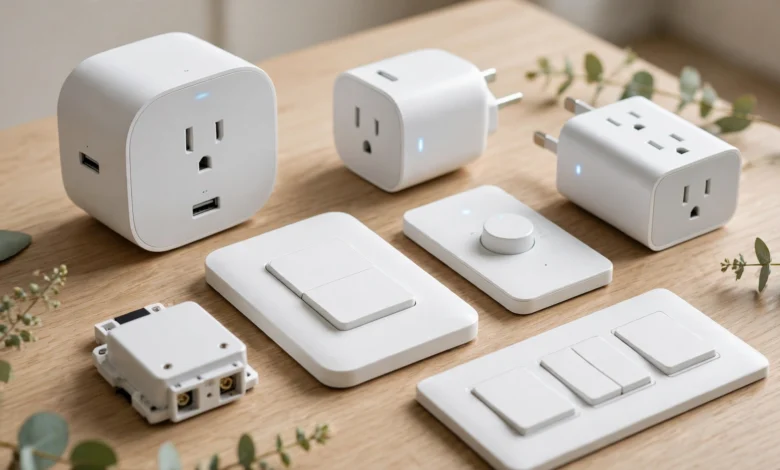
Best Smart Plugs and Switches for Home Automation
introduction
The best smart plugs and switches are the easiest way to start automating a home. You do not need to rewire anything or replace your appliances. Plug a lamp into a smart plug, or swap a wall switch for a smart one, and suddenly your lights follow a schedule, your fan turns off when you leave, and you can see which devices are quietly eating electricity.
That simplicity is also why these small devices deserve more thought than they usually get. Every smart plug is a tiny computer connected to your Wi-Fi and plugged into mains power. Get a bad one and you can end up with two different problems. The first is electrical: in 2023, about 80,000 smart plugs were recalled in North America because poor grounding created shock and fire risks. The second is digital: insecure connected devices were the raw material for the Mirai botnet, which knocked major websites offline in 2016, and the U.S. government has since sued and investigated device makers over security failures.
This guide keeps both risks in view. You will get clear picks for plugs and in-wall switches, explained in plain language: what Matter actually means, when you need a neutral wire, and how much load a plug can safely handle. Then you will see what went wrong in real cases, and finish with a short checklist to install and secure your devices properly. Smart homes should make life easier, not riskier.
How to Choose the Best Smart Plugs and Switches
Most buying mistakes come from picking the wrong type of device or the wrong connection standard. Sort these out first and the product choice becomes easy.
Smart Plug or Smart Switch?
A smart plug sits between an outlet and a device. A smart switch replaces the light switch on your wall. Each has a clear job:
- Choose a smart plug for lamps, fans, coffee makers, space-limited setups, and anything you might move later. Plugs need no tools, so they suit renters.
- Choose a smart switch for ceiling lights and any fixture controlled from the wall. A switch keeps working like a normal switch for guests, and it avoids the classic problem of someone flipping off the wall switch and leaving your smart bulbs unreachable.
Many homes end up using both: switches for overhead lighting, plugs for everything that plugs in.
Matter, Thread, Wi-Fi, or Zigbee?
This is where most confusion comes from. In plain terms:
- Wi-Fi: connects straight to your router with no hub. Simple, but dozens of Wi-Fi devices can crowd a cheap router.
- Zigbee and Z-Wave: low-power mesh networks that need a hub, such as certain Amazon Echo models, SmartThings, or Home Assistant. Very reliable once set up.
- Matter: a shared standard backed by Apple, Google, Amazon, and Samsung. A Matter smart plug works with Apple Home, Google Home, Alexa, and SmartThings, so you are not locked into one brand. Matter devices can also run locally, so basic control still works if the internet goes down.
- Thread: a low-power mesh network many Matter devices use. It needs a “border router,” which is built into devices like the HomePod mini, recent Nest hubs, and some Echo speakers.
For most people buying today, Matter over Wi-Fi or Thread is the safest long-term choice.
The Neutral Wire Question
Most smart switches need a neutral wire in the wall box to stay powered while the light is off. Many older homes only have line and load wires at the switch. Before buying, turn off the breaker, remove the switch plate, and look for a bundle of white (or, in some countries, blue) wires capped together at the back of the box. No neutral? Look for a smart switch no neutral wire model such as Lutron Caseta, or use smart bulbs with a wireless remote instead.
Load Ratings and Voltage
Every plug and switch has a maximum load. In North America, most smart plugs are rated 15 amps (about 1,800 watts). In 220 to 240-volt countries, ratings are typically 10 or 16 amps. Two rules:
- Do not run a heater, iron, or air conditioner close to the plug’s limit for hours. Check the device’s wattage against the plug’s rating and leave a healthy margin.
- Buy a plug made for your country’s socket and voltage. Using a travel adapter between a smart plug and the wall is a fire risk.
Useful Extras
- Energy monitoring: a smart plug with energy monitoring shows live watts and monthly totals, which helps you find energy-hungry devices.
- Compact design: pick a plug that does not block the second outlet.
- Outdoor rating: an outdoor smart plug needs a proper weather rating (look for an IP rating) for garden lights and decorations.
- Physical button: a manual on/off button helps when the app or Wi-Fi fails.
9 Best Smart Plugs and Switches for Home Automation in 2026
These picks reflect what consistently performs well across independent reviews in 2026, filtered through the safety and security lens of this guide. Six are plugs and three are in-wall switches. Prices change often, so check current listings, and make sure you buy the version made for your country.
| # | Product | Type | Connection | Best for |
|---|---|---|---|---|
| 1 | Kasa Smart Plug with Matter (KP125M) | Plug | Matter over Wi-Fi | Best overall |
| 2 | Tapo Matter Smart Plug Mini (P125M / P110M) | Plug | Matter over Wi-Fi | Best value |
| 3 | Eve Energy (Matter) | Plug | Matter over Thread | Apple homes, privacy |
| 4 | Meross Matter Smart Plug multi-pack | Plug | Matter over Wi-Fi | Whole-home on a budget |
| 5 | Amazon Smart Plug | Plug | Wi-Fi (Alexa only) | Simple Alexa setups |
| 6 | Kasa Outdoor Smart Plug (EP40) | Outdoor plug | Wi-Fi | Garden and holiday lights |
| 7 | Lutron Caseta Smart Switch | Switch | Lutron Clear Connect (hub) | No-neutral homes, reliability |
| 8 | Leviton Decora Smart (Matter) | Switch | Matter over Wi-Fi | Standard in-wall upgrade |
| 9 | Inovelli smart switches | Switch | Zigbee or Matter | Enthusiasts and Home Assistant |
Best Smart Plugs
1. Kasa Smart Plug with Matter (KP125M): Best Overall
This is the plug most 2026 reviews land on, and for good reason. It supports Matter, so it works with Apple Home, Google Home, Alexa, and SmartThings. It includes energy monitoring with live watts and running totals, and it is compact enough not to block the second outlet. Reviewed.com listed it at about $29. One caveat for U.S. buyers: TP-Link, which owns Kasa and Tapo, has been under federal review since 2024 (covered below). The plug works fine today, but follow the news.
2. Tapo Matter Smart Plug Mini (P125M / P110M): Best Value
Tapo is TP-Link’s budget line. The P125M is one of the smallest Matter plugs available, and the P110M adds energy monitoring and is common in 230-volt markets. Setup through Matter is usually quick, though some reviewers note the first pairing can be confusing. A good choice if you want several plugs without spending much.
3. Eve Energy (Matter): Best for Apple Homes and Privacy
Eve Energy uses Thread, so it does not add load to your Wi-Fi, and Eve is known for keeping data local without requiring a cloud account. It costs more than most plugs, but it is fast, reliable, and ideal if you already have a HomePod mini or Apple TV acting as a Thread border router.
4. Meross Matter Smart Plug Multi-Pack: Best for a Whole Home
If you want to automate several rooms at once, a Meross Matter multi-pack is hard to beat on price. One 2026 roundup found a four-pack with energy monitoring for about $40. Quality is solid for the price, though the app is less polished than Kasa’s.
5. Amazon Smart Plug: Best for Simple Alexa Setups
If your home runs entirely on Echo speakers, this is the easiest plug to set up. It appears in the Alexa app almost automatically. The trade-off is that it only works with Alexa and has no energy monitoring, so it is a poor fit if you might switch platforms later.
6. Kasa Outdoor Smart Plug (EP40): Best Outdoor Plug
Two independently controlled outlets in a weather-resistant body make this a good pick for garden lights, fountains, and holiday decorations. Mount it with the outlets facing down, and keep the cord connections out of standing water.
Best Smart Switches
7. Lutron Caseta: Best Smart Light Switch Overall
Caseta is widely considered the best smart light switch for reliability. It uses Lutron’s own wireless system through a small Smart Bridge hub, which keeps it off your Wi-Fi and makes it very responsive. Its biggest advantage: several Caseta dimmers work without a neutral wire, which makes them one of the few good options for older homes. The bridge also connects to Apple Home, Alexa, and Google Home.
8. Leviton Decora Smart (Matter): Best Standard In-Wall Upgrade
Leviton is a major electrical brand, and its Decora Smart Matter switches and dimmers look and feel like quality wall switches. They need a neutral wire, but connect directly over Wi-Fi with no hub and work across all major platforms through Matter.
9. Inovelli Switches: Best for Enthusiasts
Inovelli makes switches aimed at people who run Home Assistant or a Zigbee hub. They offer features like LED notification bars, multi-tap scenes, and “smart bulb mode,” which keeps smart bulbs powered while the switch still controls them. Not for beginners, but excellent for building a more advanced setup.
When to Hire an Electrician
Smart plugs need no tools, but smart switches involve mains wiring. If you have never replaced a switch, if your box has unfamiliar wiring, or if local rules require a licensed electrician, hire one. A wiring mistake can create a hidden fire risk that no app will warn you about.
The Reality Check: Botnets, Lawsuits, and Unsafe Plugs
Smart plugs look harmless, but they are internet-connected computers on mains power. The cases below show what happens when either side goes wrong. Some involve criminal hacking; others are regulators stepping in over security or electrical safety. Newest first:
| When | Who | What happened |
|---|---|---|
| 2024 to present | TP-Link (U.S.) | Federal agencies have reviewed TP-Link since 2024 over its links to China. In late 2025, the Commerce Department’s proposed sales ban reportedly gained support from Justice, Homeland Security, and Defense. TP-Link denies the claims. The review centers on routers, but the company also makes Kasa and Tapo smart plugs (CE Pro coverage). |
| April 2024 | United Kingdom | The Product Security and Telecommunications Infrastructure regime took effect, banning universal default passwords on connected consumer products sold in the UK. |
| September 2023 | Emporia (U.S. and Canada) | About 80,000 smart plugs recalled because they were not adequately grounded, creating shock and fire risks (report on the recall). |
| July 2019 | D-Link (U.S.) | Settled an FTC lawsuit alleging it advertised “advanced” security while leaving routers and cameras open to well-known flaws. It agreed to a security program with independent assessments every two years for 10 years (FTC press release). |
| December 2017 | Mirai creators (U.S.) | The three young men behind the Mirai botnet pleaded guilty to federal charges. Mirai had hijacked hundreds of thousands of poorly secured connected devices. |
| October 2016 | Mirai botnet | Infected devices were used in a huge attack on internet provider Dyn that disrupted major websites across the U.S. and Europe. |
Lesson 1: Default Passwords Turn Your Devices Into Weapons
Mirai did not use clever hacking. It scanned the internet for connected devices still using factory usernames and passwords, logged in, and enlisted them in a botnet. Owners rarely noticed. Their cameras and routers kept working while also being used to attack others. That is why the UK now bans universal default passwords, and why you should never leave any smart device on factory credentials.
Lesson 2: “Secure” on the Box Is a Marketing Claim
The FTC’s case against D-Link turned on a gap between advertising and reality: the company promoted advanced security while, according to the FTC, failing basic testing for known flaws. The lesson for buyers is to judge brands by their track record. Look for regular firmware updates, a published way to report vulnerabilities, and a clear support period, not by adjectives on the packaging.
Lesson 3: Cheap Plugs Can Fail Electrically
The Emporia recall involved a real brand sold through mainstream stores, not a back-alley knockoff. Poor grounding is invisible to buyers, which is why third-party safety marks matter. In North America, look for UL or ETL listing. In other regions, look for the local mark, such as CE in Europe and UKCA in Britain. Unbranded plugs with no certification and no traceable manufacturer are the riskiest products in this category.
Lesson 4: Geopolitics Can Affect Your Smart Home
The TP-Link review shows that a product’s future can depend on more than its quality. If sales or cloud services were ever restricted, cloud-dependent devices could lose features. This is one more argument for Matter devices with local control: they keep working through Apple Home, Google Home, or Home Assistant even if one company’s app or cloud changes. Before relying heavily on any one brand, check the current status of the story rather than assuming.
Setting Up the Best Smart Plugs and Switches Safely
Buying a good device is half the job. The other half is installing and securing it properly. This checklist takes about 20 minutes for a typical home.
Electrical Safety
- Check the label. Confirm the plug’s amp and watt rating, and make sure it carries a recognized safety mark for your region.
- Match the load. Keep heaters, irons, kettles, and air conditioners well below the plug’s maximum, or avoid smart plugs for them entirely. Use a heavy-duty plug made for high loads if the manufacturer offers one.
- No adapters or daisy chains. Do not plug a smart plug into a travel adapter, extension reel, or another smart plug.
- Turn off the breaker for switches. Use a non-contact voltage tester to confirm the power is off before touching wires. If in doubt, call an electrician.
- Feel for heat. In the first few days, check whether the plug feels hot under load. Warm is normal; hot is not. Stop using it if it smells, buzzes, or discolors.
Network Security
- Change default credentials. Use a strong, unique password for each smart home app account, and turn on two-factor authentication wherever it is offered.
- Update firmware. Install updates during setup and enable automatic updates if available.
- Use a guest or IoT network. Many routers let you create a separate network for smart devices, which keeps them away from your laptop and phone.
- Secure your router first. Your router is the front door. Keep its firmware current and replace it if the maker has stopped issuing updates.
- Prefer local control. Matter and Thread devices can work without the cloud. Fewer cloud connections mean fewer ways in.
- Remove what you do not use. Delete old devices from your apps and factory-reset any plug before giving it away or selling it.
Smart Automation Ideas That Actually Save Effort
- Turn lamps on at sunset and off at bedtime with a schedule.
- Use energy monitoring to find devices that waste power on standby, such as old TVs or set-top boxes.
- Set an “away” routine that randomly switches lights to make the home look occupied.
- Add a safety timer to devices like coffee makers so they shut off automatically after an hour.
- Use a smart switch with motion or presence sensors for hallways and bathrooms.
Conclusion
The best smart plugs and switches in 2026 share a few traits: Matter support so they work across Apple Home, Google Home, Alexa, and SmartThings, a load rating that fits what you plug in, a recognized safety mark, and a maker with a real record of security updates. For most people, a Kasa or Tapo Matter plug covers everyday automation, Eve Energy suits Apple homes that want local control, a Meross multi-pack automates a whole home cheaply, and Lutron Caseta or Leviton Decora Smart handle in-wall lighting, with Caseta the go-to when there is no neutral wire. The Mirai botnet, the FTC’s case against D-Link, the Emporia smart plug recall, and the ongoing federal review of TP-Link all show that these small devices carry real electrical and digital risks, so change default passwords, keep firmware current, put smart devices on their own network, avoid uncertified plugs, and call an electrician when wiring is beyond your comfort zone.