ChatPlayground AI is one of those tools that makes you wonder why you didn’t find it sooner. If you’ve spent any time working with AI, you already know the frustration: ChatGPT open in one tab, Claude in another, Gemini in a third, and suddenly you’re spending more time tab-switching than actually getting work done. It’s a productivity killer disguised as productivity.
That’s the exact problem ChatPlayground AI was built to solve. Instead of juggling five different subscriptions and five different browser windows, you get a single, unified workspace where you can run one prompt across multiple AI language models at the same time and watch the results come in side by side. It sounds simple, but in practice, it changes the way you work.
This ChatPlayground AI review covers everything you need to know before signing up: what the platform actually does, which features are genuinely useful, where it falls short, how the pricing stacks up, and whether it’s worth your money in 2026. We tested it across writing, research, coding, and prompt engineering tasks to give you a realistic picture. No fluff, no hype, just a clear breakdown.
Whether you’re a content creator, a developer, a marketer, or just someone who uses AI tools daily and wants to stop paying for multiple subscriptions, this review is for you.
What Is ChatPlayground AI?
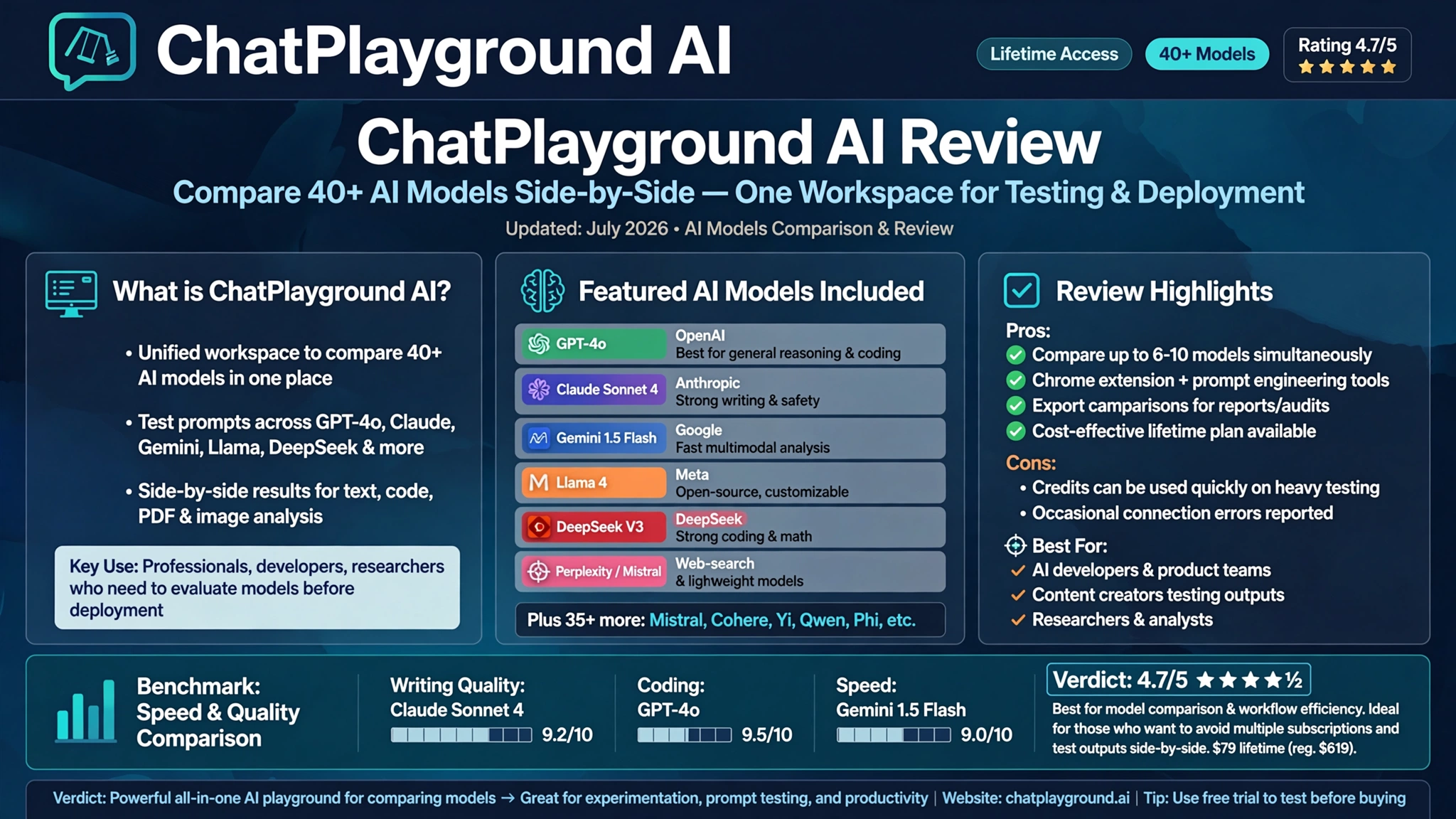
ChatPlayground AI is a browser-based platform that gives you access to more than 40 AI models through a single interface. You type one prompt, hit send, and multiple models respond at once. You can then compare those responses side by side, pick the best one, and move on.
The platform currently supports major models including GPT-4o, Claude Sonnet 4, Gemini 1.5 Flash, DeepSeek V3, Llama, Perplexity, Mistral, Grok, and more. That roster alone covers most of what professionals need on a daily basis.
But ChatPlayground isn’t just a comparison tool. It also includes:
- A Web Copilot Chrome extension for AI assistance on any webpage
- Chat with PDF for document-based conversations
- Chat with YouTube for video content analysis
- An AI document editor for writing and editing
- AI image generation from text prompts
- A prompt library with prebuilt templates
- Multilingual support across 100+ languages
Think of it as an AI control center. You can check it out at ChatPlayground AI and get a feel for the interface right away.


Key Features of ChatPlayground AI
Multi-Model Comparison — The Core Feature
The headline feature of ChatPlayground AI is its multi-model playground, and it genuinely delivers. You start with a split-screen view — say, GPT-4o on the left and Claude Sonnet on the right. You can scale this up to compare three, four, or even six models simultaneously, all responding to the same prompt in real time.
This matters more than it sounds. Every AI model has different strengths. Claude tends to be more thorough and nuanced. GPT-4o is fast and versatile. Gemini handles certain reasoning tasks differently. When you’re testing a prompt for a campaign, an article, or a code function, seeing all the outputs at once helps you pick the best result without bias.
In practical testing, the multi-model view makes prompt engineering significantly faster. Instead of copying the same prompt into five different tabs, you fire it once and compare. The differences between models become obvious quickly — some are concise, some add unnecessary caveats, some excel at structure. That comparison becomes your real insight.
Each model response costs one credit from your monthly allocation, so a six-model query uses six credits. It’s a reasonable system, and for most users, the monthly credit limit won’t be a constraint.
Web Copilot Chrome Extension
The Web Copilot is the feature that earns its place in your daily routine. It’s a Chrome extension that layers AI assistance over any webpage you’re visiting. You highlight text on any site, and a contextual menu appears with options like summarize, reply, rewrite, improve, or expand.
If you’re reading a long article and want a quick summary, one click handles it. If you’re drafting an email reply and want the AI to match a specific tone, the extension can do that in context. There’s also a sidebar you can open on any page that pulls in the content you’re viewing, making it easy to ask questions about what you’re reading without copying and pasting anything.
The prompt organization within the extension uses categories and subcategories, which works well once you learn the hierarchy. It becomes particularly useful for repetitive tasks — creating a reusable “summarize in 3 bullets” prompt that you can trigger on any page in seconds.
One limitation worth noting: the Web Copilot is Chrome-only. If you use Firefox, Safari, or Edge as your primary browser, this feature simply won’t be available to you.
Chat with PDF and Chat with YouTube
These two features turned out to be more useful than expected.
Chat with PDF lets you upload a document and then have a conversation with it. Ask it to summarize the key points, find a specific section, extract data, or compare sections against each other. For researchers, lawyers, students, or anyone who regularly works with long documents, this saves a meaningful amount of time.
Chat with YouTube works similarly. Paste a YouTube URL, and the tool processes the video’s transcript. You can then ask questions about the content, request a summary, or generate a written article from the video. In testing, both ChatGPT and Claude produced solid article drafts from a video transcript — which makes this genuinely useful for content creators who repurpose video material into written content.
Vision and Image Understanding
ChatPlayground supports image uploads for visual analysis. This isn’t AI image generation — it’s image understanding. You upload a photo and the AI tells you what it sees.
This has real practical uses: product identification, screenshot interpretation, reading charts or graphs, analyzing marketing visuals, or just asking what ingredients are in a photo of food. Multiple models handle vision inputs, and the accuracy across models is generally good. GPT-4o and Gemini both performed well in testing on visual tasks.
AI image generation is also included, but it’s one of the weaker features. Results can be inconsistent, and you’ll often need to refine your prompt significantly to get a usable output. If image generation is a core part of your workflow, a dedicated tool like Midjourney will do better work. For occasional image needs, it’s a reasonable bonus.
AI Document Editor and Writing Tools
The AI document editor is a split-screen workspace — your content on one side, an AI assistant on the other. You can write or paste content, then ask the AI to improve, shorten, capitalize, or expand selected text. There’s also a template library with prebuilt prompts for newsletters, product descriptions, SEO content, and various copywriting frameworks.
It works, but it’s not a replacement for a dedicated writing tool. There were occasional bugs during testing, and the experience feels like a bonus feature rather than a core product offering. If you already have a writing workflow you’re happy with, you probably won’t switch to this. But for users who want everything in one place, it gets the job done.
Prompt Library and Saved Prompts
The prompt library is genuinely useful, especially for teams. You can save custom prompts with specific personas and tones — for example, “You are a senior technical editor. Be direct. Avoid hype.” This lets you compare model outputs based on reasoning quality rather than style, since the persona filters out surface-level differences.
The library supports categories and subcategories, and you can share saved prompts within team workspaces. For anyone doing systematic prompt testing, this feature significantly speeds up the workflow.
ChatPlayground AI Pricing — What Does It Actually Cost?
Pricing for ChatPlayground AI runs across a few different tiers. The platform currently offers a monthly subscription starting at $20/month, which gives you access to 20+ AI models in a single subscription — roughly the same cost as one individual AI subscription on its own.
There have also been lifetime deal options available through platforms like AppSumo and StackSocial, typically ranging from around $39.99 to $239 depending on the tier:
- Tier 1 — Single user, entry-level query limit
- Tier 2 — Single user with more monthly queries
- Tier 3 ($239 range) — Five seats with increased queries, suitable for small teams
- Tiers 4 and 5 — Scale up to 10 and 25 seats respectively
For context, a Claude Teams subscription alone runs around $150/month. A five-seat ChatPlayground plan at its lifetime deal pricing can pay for itself in under two months if your team currently uses multiple AI tools separately.
That said, pricing can change, and lifetime deal terms should always be verified before purchase. Check the current plans directly at ChatPlayground AI to confirm what’s available.
A free trial is also available, which lets you test the interface before committing.
Who Is ChatPlayground AI Best For?
ChatPlayground AI isn’t for everyone, and being honest about that matters. Here’s a clear breakdown:
It’s a great fit for:
- Content creators and writers who use AI for research, drafting, and editing and want to compare outputs across models
- Prompt engineers and developers who run systematic experiments across models and need a fast comparison workflow
- Marketing teams that rely on AI for campaign copy, ideation, and content strategy
- Researchers and students who work with PDFs, YouTube content, and need to process large amounts of information efficiently
- Small teams that are currently paying for multiple AI subscriptions and want to consolidate costs
- AI enthusiasts who want access to a wide range of models without managing separate accounts
It’s probably not the right tool if:
- You only use one AI model and have no interest in comparing alternatives
- Your primary need is advanced image generation (a dedicated tool will serve you better)
- You rely on a browser other than Chrome (the Web Copilot extension is Chrome-only)
- You need deep integrations with enterprise systems or proprietary data pipelines
ChatPlayground AI vs. Using Individual AI Subscriptions
The most natural question when evaluating ChatPlayground AI is whether it’s actually better than just keeping your individual subscriptions. Here’s an honest comparison.
| Factor | ChatPlayground AI | Individual Subscriptions |
|---|---|---|
| Cost | One plan covers 20–40+ models | $20+/month per model |
| Workflow | Single interface, one prompt | Multiple tabs, repeated prompts |
| Model access | GPT-4o, Claude, Gemini, Llama, Mistral, and more | Whatever you subscribe to |
| Comparison | Side-by-side in real time | Manual, tedious |
| Privacy | No server storage, no AI training use | Varies by platform |
| Web integration | Chrome Copilot extension | None (model-specific) |
| PDF/document chat | Built-in | Varies by model |
The value proposition is strongest if you regularly use more than two AI models. If you’re already paying for ChatGPT Plus and Claude Pro, ChatPlayground can potentially replace both at a lower combined cost while adding comparison capability on top.
According to research published by Stanford HAI, AI tool adoption is accelerating across industries — and the professionals getting the most value are typically those who treat different models as specialized tools rather than committing to just one. ChatPlayground’s core design philosophy lines up directly with that approach.
Real-World Performance: What the Testing Showed
Here’s what came out of actual testing across different use cases:
Writing and Content
Running the same article brief through ChatGPT-4o, Claude Sonnet, and Gemini side by side made the differences between models immediately clear. Claude’s output was generally more thorough and included structural elements like FAQs without being asked. GPT-4o was faster and more concise. Gemini landed somewhere in the middle. Having all three on screen at once made it easy to pull the best parts from each.
Research Tasks
For research prompts that required up-to-date context, enabling web search within ChatPlayground improved response quality noticeably. Models with web access returned more specific, current references. The Chat with YouTube feature worked well for content repurposing — feeding in a 20-minute tutorial and generating a structured written summary took under two minutes.
Coding
Testing coding prompts across models revealed real differences in approach. Some models produced cleaner code with better comments; others added defensive logic that wasn’t requested. For developers who need to pick the right model for a coding task, the side-by-side comparison is genuinely useful rather than just a gimmick.
Prompt Accuracy Test
The classic “how many R’s in strawberry?” test across six models: ChatGPT-4o, Claude, Gemini, Perplexity, and Llama all answered correctly (three). Mistral returned two. This kind of quick benchmark is much faster to run when all six models respond to the same prompt simultaneously.
What ChatPlayground AI Gets Right
- Unified interface — genuinely reduces tool-switching fatigue
- Multi-model comparison is one of the best implementations of this concept available
- Web Copilot extension adds practical daily value for browsing and research
- Chat with PDF and YouTube are surprisingly capable for content work
- Privacy-focused — no data stored on servers, no use for AI training
- 100+ language support for global users
- Prompt library with team sharing improves consistency
What ChatPlayground AI Gets Wrong
- Chrome-only for the Web Copilot extension — a real limitation for non-Chrome users
- Image generation is inconsistent and not competitive with dedicated tools
- Document editor has bugs and feels like a secondary feature
- Pricing transparency can be confusing, especially when deal pricing runs through third-party resellers
- Some AppSumo lifetime deal users have reported service changes post-purchase, which is worth researching before committing to a lifetime tier
- The Mixture AI feature (which aggregates model responses into one) needs more refinement
Final Verdict: Is ChatPlayground AI Worth It?
ChatPlayground AI earns a solid recommendation with a few honest caveats. The multi-model comparison feature is legitimately useful, not just as a novelty. The Web Copilot extension earns its place in a daily workflow. The Chat with PDF and YouTube tools are better than expected. And the pricing, particularly if you’re currently paying for multiple AI subscriptions separately, represents real value.
It’s not a perfect product. The image generation is average, the document editor is rough around the edges, and Chrome-only browser support is a meaningful restriction. A few reports of service changes for legacy lifetime deal holders are worth noting.
But for content creators, marketers, researchers, and developers who want to stop paying separately for ChatGPT, Claude, and Gemini while gaining the ability to compare all of them in one place, it’s a compelling option. You can try it and check current pricing directly at ChatPlayground AI.
If you regularly use more than two AI tools and find yourself switching tabs constantly, ChatPlayground AI solves that problem efficiently and affordably.
Conclusion
ChatPlayground AI is a well-built, genuinely useful tool for anyone who works with multiple AI language models on a regular basis. Its core strength — running a single prompt across 40+ models and comparing results side by side — solves a real problem that millions of AI users face every day. The Web Copilot extension, Chat with PDF, and Chat with YouTube features add enough daily utility to make this more than just a comparison novelty. Pricing is competitive, especially against the cost of maintaining separate ChatGPT, Claude, and Gemini subscriptions. The weaknesses are real but targeted: image generation is inconsistent, the document editor needs work, and Chrome-only browser support limits accessibility. Overall, for content creators, developers, prompt engineers, and marketing teams who rely on AI tools daily, ChatPlayground AI delivers strong value in a single, organized workspace.