How to Set Up Microsoft Office for Free (Legally) in Pakistan
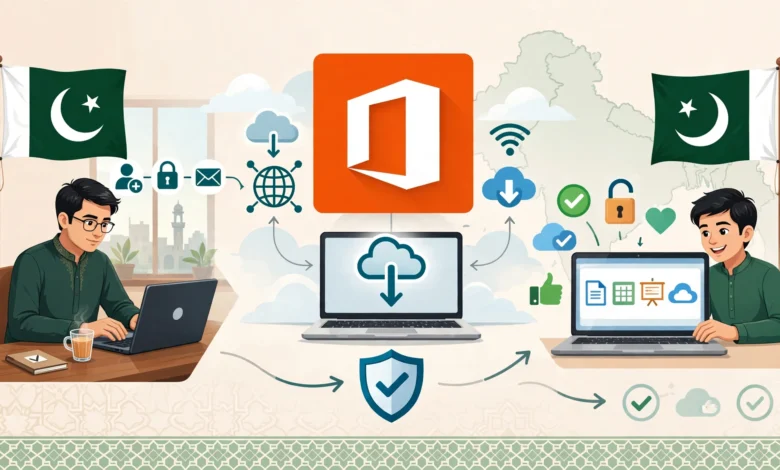
Microsoft Office for free in Pakistan is possible legally through web apps, student accounts and mobile apps. A clear setup guide with the risks of cracks.
Microsoft Office for Free in Pakistan: 6 Proven and Safe Legal Methods for 2026
Introduction
Microsoft Office for free sounds like something you only find on shady download sites, but in Pakistan there are several fully legal ways to use Word, Excel and PowerPoint without paying a single rupee. Many people simply do not know about them, so they end up buying a cheap “activated” laptop from a computer market or downloading a cracked copy that quietly opens the door to malware.
That shortcut has real costs. Cracked Office installers are one of the most common ways viruses, password stealers and ransomware get onto Pakistani computers. Pirated copies also stop updating, break without warning and can land a business in legal trouble during an audit.
The good news is that Microsoft itself offers free options. You can use Microsoft 365 for the web straight from a browser, install the free mobile apps on your phone, and, if you are a student or teacher, claim a full Office 365 for students license through your university email. Some employers and nonprofits also provide licenses at no cost to you.
This guide walks you through each legal method step by step, compares free alternatives like LibreOffice and Google Docs, and explains when paying for a subscription actually makes sense. It also looks honestly at software piracy, with real cases from Pakistan and around the world, so you understand why genuine Office is worth the small effort it takes to set up.
6 Legal Ways to Get Microsoft Office for Free in Pakistan
Not every option suits everyone. The table below gives a quick overview, and each method is explained in detail after it.
| Method | Who it suits | What you get | Desktop apps? |
|---|---|---|---|
| Microsoft 365 for the web | Anyone with a Microsoft account | Word, Excel, PowerPoint, OneNote in the browser, 5 GB OneDrive | No |
| Free mobile apps | Phone users | Core editing on smaller screens | No |
| University or school account | Students and teachers | Office 365 education plan, often with installable apps | Often yes |
| Employer license | Staff at companies using Microsoft 365 | Full apps under company policy | Yes |
| One-month free trial | Anyone needing a short project | Full Microsoft 365 for a month | Yes |
| Nonprofit programs | Registered NGOs and charities | Donated or discounted plans | Depends on plan |
1. Microsoft 365 for the web
The easiest way to use Microsoft Office for free is the browser version. Sign in with any free Microsoft account (an Outlook.com or Hotmail address works) at the official Microsoft 365 website, and you get online versions of Word, Excel and PowerPoint free, plus OneNote and 5 GB of OneDrive storage.
The web apps cover most everyday work: CVs, assignments, invoices, budgets and presentations. Files save automatically to the cloud, and you can share and co-edit with others in real time. The main limits are that you need an internet connection and some advanced features, such as complex macros and certain Excel data tools, are missing.
2. Free Office mobile apps
Microsoft’s mobile apps for Android and iPhone let you create and edit documents for free on phones and smaller tablets. Download the Office mobile app (now branded as the Microsoft 365 app) or the separate Word, Excel and PowerPoint apps from Google Play or the App Store. Larger tablets need a subscription for full editing.

3. Office 365 for students and teachers
This is the best deal for anyone in education. Through Microsoft’s long-running Education Alliance with the Higher Education Commission, students and staff at many HEC-recognized universities can use Office 365 for students at no cost through their university email. When the program launched in 2015, it allowed genuine Office installs on up to five PCs or Macs plus mobile devices.
The exact plan depends on your institution. Some universities offer browser-only access, while others include the full installable desktop apps and 1 TB of OneDrive storage. Ask your university IT office, or check eligibility on Microsoft’s education page with your institutional email.
4. Through your employer
If your company or bank uses Microsoft 365, your work account may let you install Office on your personal laptop and phone. This is fully legal, but follow your employer’s IT policy and remember the license ends when you leave the job.
5. The Microsoft 365 free trial
Microsoft regularly offers a one-month free trial of Microsoft 365 Personal or Family for new subscribers. It is handy for a short project like a thesis deadline. You usually need a card that supports international payments, and you must cancel before the trial ends to avoid being charged.
6. Nonprofit programs
Registered nonprofits in Pakistan may qualify for donated or heavily discounted Microsoft 365 plans through Microsoft’s nonprofit program. Terms have changed over the years, so check current eligibility and plan details before applying.
How to Set Up Microsoft Office for Free Step by Step
The setup takes only a few minutes for each method. Follow the steps for whichever option fits you.
Set up Microsoft Office for free in your browser
- Go to microsoft365.com on any computer.
- Click Sign in, then choose Create one if you do not already have a Microsoft account. A Gmail address also works as your login.
- Verify your email or phone number. Pakistani mobile numbers are accepted for verification.
- Once signed in, open Word, Excel or PowerPoint from the app launcher.
- Upload existing files to OneDrive, or start a new document. Everything saves automatically.
- Install the website as an app in Chrome or Edge (Install option in the browser menu) so it opens like desktop software.
Activate Office 365 for students with your university email
- Find your official university email address. It usually ends in .edu.pk and is issued by your IT department or student portal.
- Visit Microsoft’s education page and enter that email to check eligibility.
- Sign in with the account your university provides. Do not create a personal account with the university email.
- Open microsoft365.com and look for Install apps in the top-right corner. If you see it, your plan includes desktop apps.
- Download the installer directly from Microsoft and run it. Activation happens automatically when you sign in.
- If the install button is missing, your plan is web-only. Use the browser apps or ask IT whether desktop licenses are available.
Get Microsoft Office for free on your phone
- Open Google Play or the App Store.
- Search for Microsoft 365 (or Word, Excel and PowerPoint separately). Check that the publisher is Microsoft Corporation.
- Install and sign in with your Microsoft account so your files sync with OneDrive.
- Use the built-in scanner to turn paper documents into editable PDFs or Word files.
Tips to make free Office work better
- Keep important files in OneDrive so you can switch between phone, laptop and lab computers.
- Use offline mode on mobile apps for load-shedding hours, then sync later.
- Turn on two-step verification for your Microsoft account to protect your documents.
- Students should download a backup of their work before graduating, since university licenses usually end after you leave.
Free Alternatives When Microsoft Office for Free Is Not Enough
Sometimes the free web apps feel limited, or you need offline desktop software without a university account. These legal alternatives open and save Word, Excel and PowerPoint files at no cost.
LibreOffice
LibreOffice is free, open source desktop software that runs fully offline on Windows, Mac and Linux. Writer, Calc and Impress handle DOCX, XLSX and PPTX files well. Complex formatting can shift slightly, so check important documents before sending them. It is a great choice for older laptops and for offices that want legal software on many PCs without any licensing cost.
Google Docs, Sheets and Slides
Google’s free tools run in the browser with a Gmail account and are excellent for collaboration. They import and export Office formats, and offline mode works in Chrome.
WPS Office and OnlyOffice
WPS Office looks very similar to Microsoft Office and has a free version supported by ads. OnlyOffice offers free desktop editors with strong compatibility. Download both only from their official websites.
When paying for Microsoft 365 makes sense
Free options are enough for most students and home users. Paying becomes worth it when:
- You run a business and need clean licensing for audits, client contracts or government tenders.
- You rely on advanced Excel features, macros, Power Query or Access databases.
- You need 1 TB of cloud storage or want to share one plan with family members.
- Clients require perfect formatting fidelity in Word and PowerPoint files.
Microsoft sells subscriptions in Pakistan through its website and authorized resellers. Buying from authorized sellers protects you from the fake “lifetime keys” often sold online for a few hundred rupees, which are usually stolen volume license keys that get blocked later.
The Reality of Cracked Office: Ethics, Law and Real Cases
It is no secret that cracked Office is everywhere in Pakistan. Many laptops sold in computer markets come with pirated copies preinstalled, and activator tools like KMSPico are shared openly in WhatsApp groups and YouTube comments. The fact that piracy is common does not make it safe or legal, and real cases show why.
Software piracy in Pakistan
Software piracy in Pakistan has been a long-running concern. Industry surveys by BSA, The Software Alliance, have estimated for years that a large majority of software installed in the country is unlicensed, and Pakistan has appeared repeatedly on the US Trade Representative’s Special 301 lists over weak intellectual property enforcement.
That is not just a foreign complaint. Pakistan’s Copyright Ordinance 1962 explicitly protects computer programs, and infringement can lead to fines and imprisonment of up to three years. The Intellectual Property Organisation of Pakistan and dedicated IP tribunals handle these cases, and businesses can face raids, seizures and civil claims. As Pakistan’s IT export industry grows, foreign clients increasingly ask software houses and freelancers to prove they use licensed tools.
Real cases from around the world
- Operation Summer Solstice (2007). The FBI and Chinese police dismantled a counterfeiting ring that produced fake Microsoft and Symantec software worth an estimated 2 billion US dollars. Around 25 people were arrested, and the case showed how organized and profitable software piracy had become.
- Eric Lundgren (2018). A US recycler was sentenced to 15 months in prison for making about 28,000 Windows restore discs he planned to sell to refurbishers. He argued the discs had little value without licenses, but the court sided with Microsoft. Even well-meaning copying of Microsoft software can be treated as a serious crime.
- Fake KMSPico downloads (2021). Security firm Red Canary reported that fake KMSPico activator downloads were being used to spread CryptBot, a password-stealing malware that grabs saved browser logins and cryptocurrency wallets. People thought they were getting free Office and lost their accounts instead.
The hidden costs of cracked Office
- Malware and data theft. Activators need deep system access, which makes them a favorite way to hide viruses, keyloggers and banking trojans.
- No security updates. Pirated copies often block updates, leaving known vulnerabilities open for attackers.
- Lost work. Cracked versions can deactivate suddenly, lock files or crash during exams and deadlines.
- Legal and business risk. A licensing audit or a client compliance check can uncover pirated software and damage your reputation.
- Ethical cost. Developers, including Pakistani software houses, depend on people paying for their work. Using pirated software undermines the same industry many young Pakistanis hope to build careers in.
A simple ethical rule
If a method needs an activator, a “lifetime key” for a few hundred rupees, a modified installer or a disabled antivirus, it is not legal. Every method in this guide works with an official Microsoft download and a normal sign-in.
Frequently Asked Questions About Microsoft Office for Free
Is it legal to use Microsoft Office for free in Pakistan?
Yes, as long as you use official routes. Microsoft 365 for the web, the mobile apps, university education plans, employer licenses and official trials are all legal ways to use Microsoft Office for free.
Can students in Pakistan get the full desktop version of Microsoft Office for free?
Often, yes. Many HEC-recognized universities provide Office 365 accounts that include installable desktop apps. It depends on your institution’s plan, so check with your IT office using your .edu.pk email.
Does Microsoft Office for free work offline?
The web version needs internet. The mobile apps and university desktop apps work offline and sync later. For a fully offline free suite without any account, LibreOffice is the best legal option.
Are cheap “lifetime” Office keys sold online legal?
Almost never. Keys sold for a fraction of the real price are usually stolen, reused volume keys or keys meant for other regions. Microsoft can block them at any time, and buying them supports fraud.
Is KMSPico safe to use?
No. It is a piracy tool, it breaks Microsoft’s license terms and copyright law, and fake versions have been used to spread password-stealing malware.
Conclusion
Getting Microsoft Office for free in Pakistan is easier than most people think, because Microsoft 365 for the web gives anyone with a free account access to Word, Excel and PowerPoint, the mobile apps handle editing on phones, students and teachers at many HEC-recognized universities can unlock full Office 365 licenses through their university email, employers and nonprofits can provide licenses, and a one-month trial covers short projects, while LibreOffice and Google Docs fill any remaining gaps at no cost; with all these legal options available, cracked copies and activators like KMSPico simply are not worth the risk, as cases from Operation Summer Solstice and Eric Lundgren’s prison sentence to malware-laced fake activators show, and Pakistan’s own copyright law treats software piracy as a punishable offense, so set up genuine Office the right way, protect your files and data, and support the same software industry that is creating so many opportunities for Pakistanis today.