How to Choose a Reliable Extension Board for Multiple Devices
Extension board buying guide covering load ratings, wire quality, surge protection and fake products, so you can power multiple devices safely.
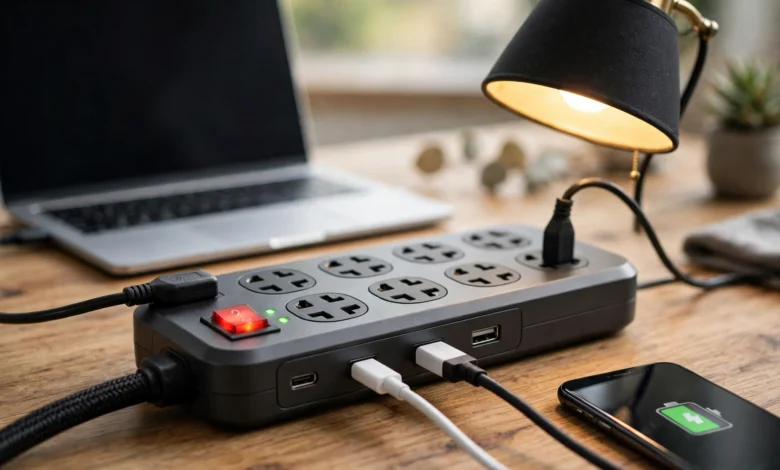
Extension Board Buying Guide: 9 Proven Tips to Choose a Safe, Reliable One for Multiple Devices
Extension board shopping looks simple. You walk into a shop, pick a board with enough sockets, pay a few hundred or a few thousand rupees and plug everything in. Most people never think about it again until the plug feels hot, a socket starts sparking or the board melts behind the TV.
That casual attitude is risky. A single board often powers a router, a laptop charger, a phone charger, an iron and sometimes a heater or a microwave, all through one thin cable. If the wiring inside is undersized or the plastic is not fire-resistant, the board becomes the weakest link in the whole circuit. Karachi alone recorded roughly 2,400 fire incidents in 2025, and electrical faults are repeatedly cited as a leading cause of fires in Pakistani homes, shops and markets.
This extension board guide explains how to choose a reliable extension board for multiple devices: how much load it can safely carry, what to look for in copper wiring, sockets and switches, when you need surge protection and how to spot a fake. It also looks honestly at the dark side of this market, from counterfeit power cords recalled in their hundreds of thousands to substandard boards flagged by safety regulators.
You do not need to be an electrician to make a good choice. You just need to know which details matter, which marketing claims to ignore and which cheap shortcuts can put your home and family at risk.
How an Extension Board Works and Why Cheap Ones Fail
An extension board does not create extra electricity. It simply takes the power from one wall socket and splits it across several outlets. Whatever you plug into it, every device shares the same cable, the same plug and the same wall socket. That one fact explains most extension board failures.
Total Load Is Shared, Not Multiplied
If you plug six devices into a six-socket board, all six draw current through one cable. A board rated at 10 amps can carry about 2,200 watts on Pakistan’s 220-volt supply. A 13-amp board handles roughly 2,860 watts, and a 16-amp board around 3,500 watts. The number of sockets tells you nothing about how much load the board can handle.
Here is a rough idea of how much common devices draw. These are approximate figures, so always check the label on your own appliances.
| Device | Approximate Power Draw |
|---|---|
| Phone charger | 5 to 25 W |
| Wi-Fi router | 10 to 20 W |
| Laptop charger | 45 to 100 W |
| LED TV | 50 to 150 W |
| Desktop PC with monitor | 200 to 500 W |
| Microwave oven | 1,000 to 1,500 W |
| Clothes iron | 1,000 to 2,000 W |
| Electric heater | 1,000 to 2,000 W |
| Electric kettle | 1,500 to 2,200 W |
Phones, routers, laptops and TVs together use very little. Add a single iron, heater or kettle and the board can jump close to its limit in seconds.
Wire Thickness Decides How Much Heat Builds Up
Current flowing through a wire produces heat. Thick copper wire carries current easily and stays cool. Thin wire, or wire made of copper-coated aluminium instead of pure copper, resists the current and heats up. Cheap boards often use cable that looks thick only because of extra plastic insulation, while the metal inside is thin.
Over time, that heat softens insulation, loosens connections and blackens sockets. This is why many melted boards fail slowly over months rather than suddenly.
Loose Sockets Create Sparks
Socket contacts are small metal springs that grip a plug’s pins. In a good extension board, they are made of brass or phosphor bronze and hold the plug tightly. In a poor one, they are thin, soft metal that loosens quickly. A loose connection causes tiny sparks called arcing, which produce intense local heat and are a common start point for electrical fires.
Body Material Matters in a Fault
A quality extension board uses flame-retardant plastic that resists melting and does not keep burning once a fault stops. Cheap boards often use ordinary plastic that softens, burns and drips when overheated. You cannot see this difference in the shop, which is why brand reputation and certification marks matter so much.
9 Proven Tips to Choose a Reliable Extension Board for Multiple Devices
These tips work whether you are buying an extension board for a study desk, a home office, a TV corner or a small shop. Follow them in order and you will rule out most unsafe products before you pay.
1. Check the Current Rating First
The current rating, printed as 10A, 13A or 16A, is the most important number on any extension board. Add up the wattage of everything you plan to plug in at the same time, then make sure the total stays comfortably below the board’s limit. A good rule is to keep regular use under 80 percent of the rating.
If an extension board has no clear current or wattage rating printed on the body, do not buy it.
2. Look for Pure Copper Wiring
Ask for an extension board with pure copper wire and a cable thick enough for its rating. Reputable brands state the core size, such as 1.0 mm² or 1.5 mm², on the cable or packaging. Copper-clad aluminium wire is cheaper and lighter, but it heats up faster and is more likely to fail under heavy load.
Quick check: A genuinely thick cable feels heavy and firm. A cable that feels light and floppy despite looking thick usually has thin conductors inside.
3. Choose a Board With a Fuse or Circuit Breaker
A built-in fuse or resettable overload breaker cuts power when the load on the extension board gets too high. Without one, the board will keep supplying current until something overheats. Many of the counterfeit cords recalled abroad were dangerous precisely because they had no fuse.
4. Get Surge Protection for Electronics
Voltage spikes are common when electricity returns after load shedding or during thunderstorms. A surge protector extension board absorbs these spikes before they reach routers, TVs, laptops and desktop PCs. Look for a stated surge rating, usually listed in joules, and an indicator light that shows protection is active.
Basic boards without surge protection are fine for chargers and lamps, but not ideal for expensive electronics.
5. Test the Socket Grip
In the shop, plug a charger into each socket of the extension board. It should go in firmly and stay put without wobbling. Loose sockets cause arcing, heat and blackened contacts. Universal sockets that accept every plug shape often grip each one poorly, so a board designed for the plug type you actually use is usually safer.
6. Prefer Individual Switches and Shutters
Individual switches let you turn off devices you are not using without pulling plugs in and out, which reduces wear on the sockets. Safety shutters inside the sockets block children from pushing objects into live contacts, which matters in any home with young kids.
7. Check the Plug and Earth Connection
The main plug should be solid, well moulded and fitted with a proper earth pin. Avoid boards with two-pin plugs if you plan to connect anything with a metal body, like an iron, microwave or desktop PC. A missing earth connection removes an important layer of protection against electric shock.
8. Match Cable Length to Your Space
Buy an extension board with the length you need, not the longest available. Extra cable coiled up behind furniture traps heat, and very long cables increase resistance. If you need to reach far, it is better to have a new wall socket installed than to chain boards together.
9. Buy From a Known Brand and Trusted Seller
At the end of the day, you cannot see the copper, the socket metal or the plastic grade inside a sealed extension board. That is why brand reputation, a working warranty and a trusted seller matter. Be wary of unfamiliar names copying well-known logos, and of prices far below the market rate for the same rating.
Quick Buying Checklist
- Clear current rating printed on the board (10A, 13A or 16A)
- Pure copper wire with a stated core size
- Fuse or overload breaker built in
- Surge protection for routers, TVs and computers
- Firm socket grip with no wobble
- Individual switches and child safety shutters
- Solid three-pin plug with earth
- Sensible cable length
- Known brand, real warranty, trusted seller
The Reality Check: Fake Extension Board Products and Real Consequences
The market for cheap power strips and extension cords has a long record of counterfeits and dangerous products. These cases show what can go wrong when an extension board is built to look safe rather than to be safe.
Counterfeit Cords Recalled in the United States
Safety regulators in the US have recalled huge numbers of fake extension cords over the years:
- Pride Products (2006): About 42,000 counterfeit extension cords were recalled because they had undersized wiring and no fuse for over-current protection, which could cause overheating and fire. You can read the official CPSC recall notice for the counterfeit extension cords.
- Dollar Tree Stores (2006): Around 600,000 six-foot power extensions were recalled. The cords could have undersized wire and substandard insulation, and they carried a counterfeit safety certification label. Details are in the CPSC recall of counterfeit extension cords sold at Dollar Tree.
- Underwriters Laboratories warning (2005): UL warned that certain extension cords carried counterfeit UL marks, did not meet safety requirements and used undersized wires that posed fire and shock risks.
The common thread is clear. Counterfeiters cut costs on the parts buyers cannot see, especially copper, and then add a fake certification mark to win trust.
Unsafe Boards Sold Online
The problem has moved online. The UK’s Office for Product Safety and Standards has issued several alerts about extension leads sold through major online marketplaces. In one case, an eight-socket tower power strip was flagged as a serious fire risk because insulation between circuits could break down when two or more appliances were plugged in, causing the internal circuitry to overheat and ignite. Other alerts covered extension leads with plugs that did not meet national standards and boards with dangerously small gaps between live parts.
From the outside, each extension board looked ordinary. Their flaws were only found through laboratory testing.
Electrical Fires in Pakistan
In Pakistan, the consequences of poor electrical safety are tragically familiar. Records show that Karachi saw roughly 2,400 fire incidents in 2025 alone, and experts quoted by Dawn have blamed faulty electrical wiring for most city fires. In January 2026, a fire at Gul Plaza, a shopping centre in Karachi, killed dozens of people. Officials suspected a short circuit, though the cause was still under investigation when early reports were published.
No single extension board is responsible for problems on that scale. But overloaded boards, cheap sockets and daisy-chained cables are part of the same culture of electrical shortcuts that makes homes and markets vulnerable.
Why Counterfeit Boards Keep Selling
Fake and substandard boards stay in the market because:
- Buyers judge boards by the number of sockets and the price
- The real quality is hidden inside a sealed plastic body
- Fake certification marks and copied brand logos are easy to print
- Problems often appear months later, so buyers rarely trace a fire or failure back to the board
Selling counterfeit branded goods violates trademark law in most countries, including Pakistan. But the bigger cost is borne by buyers, who pay with damaged appliances, injuries or lost property.
How to Use an Extension Board Safely Every Day
Even the best extension board can become dangerous if it is used carelessly. These habits keep it working safely for years.
Keep High-Power Appliances on Wall Sockets
Irons, heaters, kettles, microwaves, air conditioners and washing machines should be plugged directly into a wall socket whenever possible. These appliances draw heavy current for long periods and can push an extension board to its limit on their own.
Never Daisy-Chain Boards
Plugging one board into another multiplies the load on the first board and its wall socket. It is one of the most common causes of overheating in homes and offices. If you need more sockets, buy a single board with enough outlets and the right rating, or have an electrician add wall sockets.
Give It Air
Do not bury an extension board under carpets, mattresses, curtains or piles of clothes. Heat needs to escape. Keep the board on a hard, dry surface, away from water, cooking areas and direct sunlight.
Check It Regularly
Once a month, take a quick look and feel:
- Is the plug or any socket warm to the touch?
- Are there brown or black marks around the sockets?
- Does the board smell of burning plastic?
- Is the cable cracked, flattened or taped?
- Does any plug feel loose?
If the answer to any of these is yes, stop using the extension board and replace it.
Unplug When Not in Use
Switch off and unplug the extension board when you leave home for long periods, especially during storms or long outages. Power returning after load shedding can bring spikes that damage connected devices.
Common Extension Board Mistakes to Avoid
- Choosing a board by the number of sockets instead of its current rating
- Running an iron and a heater on the same board
- Using a two-pin board for metal-bodied appliances
- Repairing a damaged cable with tape instead of replacing the board
- Buying a “branded” board at a price far below the market rate
- Keeping a board that has scorch marks because it still works
- Using indoor boards outdoors or in damp areas
Frequently Asked Questions About Choosing an Extension Board
How many devices can I plug into one extension board?
It depends on total wattage, not the number of devices. Add up the power ratings of everything you will use at the same time and keep the total well below the board’s limit. Several chargers, a router, a laptop and a TV are usually fine. A heater or iron on top of them often is not.
Is a surge protector the same as an extension board?
No. A basic extension board only splits power. A surge protector includes components that absorb voltage spikes. For computers, routers and TVs, a surge-protected board is the better choice.
What rating should I choose for a home office?
For laptops, monitors, routers, phone chargers and a desk lamp, a well-made 10A or 13A board is usually enough. If you run a desktop PC, printer and other equipment together, choose a higher rating with surge protection.
Why does my extension board get hot?
Heat usually means overload, thin internal wiring or loose socket contacts. Unplug the high-power devices first. If the board still warms up with light loads, replace it.
How long does a good extension board last?
A quality board can last many years with careful use. Replace it immediately if you see scorch marks, melting, loose sockets or a damaged cable, regardless of its age.
Conclusion
Choosing a reliable extension board for multiple devices comes down to looking past the number of sockets and the price tag and focusing on what keeps you safe: a clear 10A, 13A or 16A rating that matches your total load, pure copper wiring of the right thickness, a fuse or overload breaker, surge protection for routers, TVs and computers, firm sockets with safety shutters and a solid earthed plug from a known brand and trusted seller. The record of counterfeit extension cords recalled in the US by the hundreds of thousands, unsafe power strips flagged by UK regulators and the steady stream of electrical fires in Karachi all show that the cheapest board can be the most expensive mistake, so keep heavy appliances on wall sockets, never daisy-chain boards, check your extension board regularly for heat or scorch marks and replace it the moment something looks wrong, because a few hundred extra rupees spent on a genuine, well-built board is a small price for protecting your devices, your home and your family.