How to Choose the Right Memory Card for Your Camera or Phone
Memory card buying guide for cameras and phones: compare formats, speed classes, and capacity, and avoid counterfeit cards that can wipe out your photos.
Memory Card Guide: 7 Proven Tips to Choose the Best One for Your Camera or Phone
Introduction
Memory card shopping looks simple until you are standing in front of a wall of them. Every package shouts numbers at you: 128GB, 200MB/s, U3, V30, A2, UHS-II. Two cards with the same capacity can differ in price by five times, and the cheaper one might be perfectly fine or might quietly ruin your next holiday video.
The truth is that most people buy the wrong memory card for one of three reasons. They pick the wrong format for their device, they trust the big “up to” speed on the front of the box, or they buy a deal that is too good to be true. That last one is not a small problem. Customs agencies around the world seize counterfeit SD and microSD cards by the millions, and plenty still slip through to online marketplaces and street stalls.
This guide walks you through how to choose a memory card for a camera or a phone in plain language. You will see what the speed symbols actually mean, how much capacity you really need, and how to match a card to the way you shoot. You will also read about real seizures and raids involving fake cards, why buying them causes harm beyond your own lost files, and what ethical care looks like when you sell or buy a used card.
By the end you should be able to pick the best memory card for your camera or phone with confidence and without overspending.
Tip 1: Check Which Memory Card Format Your Device Accepts
The first rule is boring but absolute: a memory card that does not fit your slot is useless, and a card that fits but uses a standard your device cannot read is almost as bad. Before you compare prices, check the manual or the spec page for your camera or phone. Look for the card type and the maximum capacity it supports.
The Main Memory Card Formats Today
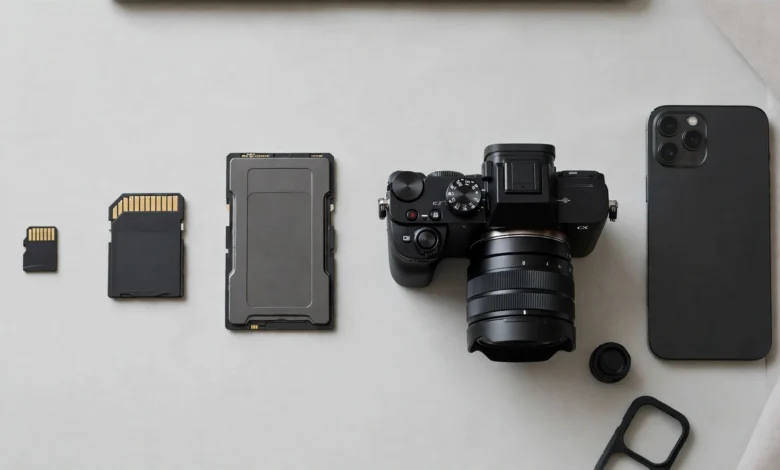
- SD card: The standard full-size card, about the size of a postage stamp. Most mirrorless cameras, DSLRs, compact cameras and many camcorders use it.
- microSD card: The fingernail-sized version used in Android phones, action cameras, drones, dashcams, security cameras and handheld game consoles. With a simple adapter it can sit in an SD slot, though usually with some speed loss.
- CFexpress: A faster, more expensive format built on PCIe. Type B cards appear in many high-end Canon and Nikon bodies, while Sony uses the smaller Type A in several of its cameras. If your camera takes CFexpress, it usually needs that speed for its top video modes.
- Older formats: CompactFlash, XQD and Sony’s Memory Stick still show up in older bodies. Only buy these if your existing gear requires them.
Dual Slots and Mixed Slots
Many cameras now have two slots, and they are not always the same. A body might pair one CFexpress slot with one SD slot. That matters because some video modes only record to the faster slot. If you plan to use the second slot for backup, the slower card can drag the whole camera down to its speed, so match both cards to what you actually shoot.
Phones Are a Different Story
On phones, the first question is whether there is a slot at all. Apple has never put one in an iPhone, Google’s Pixel phones do not have one, and Samsung dropped it from its flagship Galaxy S line starting with the S21. Many mid-range and budget Android phones still accept a microSD card, often up to 1TB. If your phone has no slot, no memory card for phone use will help, and you are better off looking at cloud storage or a USB-C flash drive.
Tip 2: Pick the Right Memory Card Capacity
Card capacity is the easier half of the decision, but it still trips people up because the labels on the card tell you two things at once: how much it holds and which standard it follows.
SD, SDHC, SDXC and SDUC Explained
| Label | Capacity range | What it means for you |
|---|---|---|
| SD | Up to 2GB | Very old. Only for legacy devices. |
| SDHC | Over 2GB to 32GB | Works in almost anything made after 2008. |
| SDXC | Over 32GB to 2TB | The current mainstream for cameras and phones. |
| SDUC | Over 2TB to 128TB | Newest standard, still rare and needs a device that supports it. |
The catch is backward compatibility. An older camera that only supports SDHC may not read an SDXC card at all, even though it fits physically. Always check the maximum capacity your device lists.

How Much Space Do You Actually Need?
A rough way to think about it is to work out your file sizes and multiply by how much you shoot between offloads.
- Photos: A 24MP JPEG is often 8 to 12MB. A RAW file from the same camera might be 25 to 50MB. A 64GB card holds roughly 1,500 to 2,500 RAW shots from a typical mid-range camera.
- Video: Bitrate is what counts. At 100Mbps, an hour of footage takes about 45GB. At 400Mbps, the same hour needs around 180GB.
- Phones: If you mainly want room for photos, offline music and maps, 128GB or 256GB is plenty for most people.
Bigger Is Not Always Better
It is tempting to buy one huge card and never think about it again. The problem is that one card means one point of failure. If a 1TB card dies or gets lost on day five of a trip, you lose everything. Many working photographers prefer two or three 128GB or 256GB cards and rotate them. It also forces you to back up more often, which is a good habit anyway.
Tip 3: Read Memory Card Speed Ratings the Right Way
Speed is where most of the confusion lives, and it is also where a cheap memory card usually falls short. The key idea is that there are two kinds of speed, and the box usually shows you the one that matters less.
Read Speed vs Write Speed
Read speed is how fast you can copy files off the card to a computer. Write speed is how fast your camera or phone can save data onto it. The big number on the front, like “up to 200MB/s”, is almost always the peak read speed. For shooting, write speed is what decides whether your camera keeps up, whether burst mode stalls, and whether video recording stops without warning.
The Speed Class Symbols
The SD Association defines minimum sustained write speeds, and the symbols on the card tell you the floor, not the peak. You can check the official definitions on the SD Association’s speed class standards page.
- Class 10 (a C with 10 inside): At least 10MB/s. Fine for photos and basic HD video.
- U1 and U3 (a number inside a U): At least 10MB/s and 30MB/s.
- V30, V60, V90: At least 30, 60 and 90MB/s. These video speed classes are the clearest guide for video shooters.
A simple way to match them: divide your camera’s video bitrate in megabits by 8 to get megabytes per second, then leave headroom. A 100Mbps 4K mode needs about 12.5MB/s, so V30 is comfortable. A 400Mbps mode needs about 50MB/s, so V60 is the safe choice. Higher bitrate modes and 8K often call for V90 or CFexpress.
Bus Interface: UHS-I vs UHS-II
The Roman numeral on the card shows the bus interface. UHS-I cards have one row of contacts and top out around 104MB/s. UHS-II cards have a second row of pins and can reach up to 312MB/s. A UHS-II card works in a UHS-I slot, but it will run at UHS-I speed. If your camera does not support UHS-II, paying extra for it only helps when you copy files on a fast card reader.
App Performance Class: A1 and A2
Phones care about something different. When apps run from the card, the phone makes lots of small random reads and writes, not big continuous ones. The A1 and A2 app performance class ratings cover that. A2 promises higher random performance than A1, but only if the phone supports A2’s features. In older or budget phones an A2 card may behave like an A1 card, which is fine, just not worth a big premium.
Tip 4: Match the Memory Card to How You Actually Shoot
The best memory card for camera work is not the fastest one money can buy. It is the one that keeps up with your device’s most demanding mode with a little room to spare. Here is how that plays out for common users.
| Who you are | Format | Suggested minimum | Typical capacity |
|---|---|---|---|
| Casual phone user (photos, music, maps) | microSD | U1, A1 | 128GB to 256GB |
| Phone user who records 4K video | microSD | U3, V30, A2 | 256GB to 512GB |
| Beginner camera, photos and HD video | SD | U3, V30, UHS-I | 64GB to 128GB |
| Enthusiast, fast bursts and 4K | SD | V60, UHS-II if supported | 128GB to 256GB |
| High-bitrate 4K, 6K or 8K video | CFexpress or SD V90 | Whatever the camera maker lists | 256GB and up |
| Action camera, drone, dashcam | microSD | V30, high endurance for dashcams | 128GB to 256GB |
Cameras: Burst Shooting and the Buffer
Your camera has a small internal buffer that holds images before they are written to the card. When you hold the shutter down, the buffer fills, and a slow card means a long wait before you can shoot again. Wildlife, sports and kids’ events are where this hurts. If you shoot in bursts, a faster write speed card with UHS-II support (if your camera has it) will clear the buffer much quicker.
Video Shooters: Sustained Speed Wins
Photos arrive in short bursts, but video is a constant stream. If the card cannot keep up for the whole clip, the camera may drop frames or stop recording. This is exactly what the V ratings were made for. Check your camera manual: many manufacturers list the minimum card class for each recording mode, and that list is more reliable than any generic advice.
Phones: Reliability Over Raw Speed
For a memory card for phone use, consistent random performance and reliability matter more than headline numbers. A reputable A1 or A2 microSD card from a known brand will feel smoother than a no-name card with a bigger number on the label. If you record 4K on the phone straight to the card, make sure it is at least V30.
Dashcams and Security Cameras
These devices write all day and overwrite old footage in loops. Normal cards can wear out quickly under that load. Look for cards labeled “high endurance” or “industrial”, which are built for constant rewriting and usually rated in hours of recording.
Tip 5: Avoid Fake Memory Cards (Real Cases You Should Know)
A fake memory card is one of the most common counterfeit electronics in the world, and it is nastier than a fake handbag because it fails silently. You often do not find out until the photos you cared about are already gone.
How Counterfeit SD Cards Fool You
According to SD-3C, the licensing body behind the SD logo, a counterfeit card might be sold as 256GB while it really holds only 16GB, and some fakes include altered firmware so your computer reports the false size. Once the real storage fills, new files overwrite old ones or simply turn into corrupted data. Fakes also tend to miss their advertised speed class, which causes dropped video frames and slow transfers. (SD-3C, via the SD Association)
Real Seizures and Raids
This is not a rare problem or an urban legend. Here are documented cases:
- Worldwide customs seizures. SD-3C reports that between January 2011 and the end of 2018, customs agencies seized about 3.9 million counterfeit SD products worth more than $56 million at retail. Its team also had more than 125,000 online listings for fake SD cards and devices taken down after 2013. (source)
- Incheon Airport, South Korea. Customs officers stopped a traveler carrying counterfeit microSD cards in from China. Had they been genuine, the cards would have been worth about $900,000. The case shows that fakes move in luggage as well as in shipping containers. (source)
- Penang, Malaysia, 2018. Enforcement officers from the Domestic Trade and Consumer Affairs Ministry raided a shop at a mall in Bayan Baru and seized 1,744 fake memory cards worth RM26,000. They were sold for RM15 to RM26 while genuine versions cost RM30 and up, and they were kept in a back store room rather than on display. Under the Trade Descriptions Act 2011, companies face fines of up to RM15,000 per fake item, and individuals face fines up to RM10,000 per item, up to three years in jail, or both. (The Star report on the Penang raid)
- Laredo, Texas. U.S. Customs and Border Protection seized 11,540 electronic tablets that carried counterfeit SD and microSD marks alongside fake Amazon and Google branding. The shipment would have been worth $1.1 million if genuine. Fake logos do not stop at the card itself; they show up on the devices that use cards too. (CBP announcement)
- New Delhi, India, 2019. Security staff at Indira Gandhi International Airport detained three passengers who allegedly tried to bring in around one lakh (100,000) microSD cards from Hong Kong without paying customs duty, valued at Rs 3 to 6 crore. Smuggled stock like this ends up in grey markets with no warranty and no traceable supply chain.
Why Buying Fakes Is an Ethical Problem, Not Just a Bad Deal
It is easy to think a fake card only hurts the person who bought it. That is not the full picture. Counterfeit operations dodge taxes, ignore safety and quality standards, and undercut the honest sellers in your local market. Shops that knowingly resell them can face fines and seizures, as the Penang case shows. And if you are a professional, handing a client a corrupted wedding or event shoot because you saved a few dollars on a counterfeit SD card is a real breach of trust.
Warning Signs of a Fake Memory Card
- The price is far below every major retailer for the same model.
- The capacity does not exist for that product line, such as a “2TB” card from a brand that never made one.
- Blurry printing, odd fonts, misspellings, or a logo that looks slightly off.
- Packaging lists one country of manufacture and the card lists another.
- The seller is a third-party account with few reviews and stock that seems endless.
Tip 6: Protect Your Data and Treat Used Memory Cards Ethically
Choosing a memory card is not only about what goes onto it. It is also about what stays on it after you are done. A card that leaves your hands still carries your life on it unless you clean it properly.
What a Real Study Found on Second-Hand Cards
In 2018, researchers at the University of Hertfordshire bought 100 used SD and microSD cards from eBay, auctions and second-hand shops. Of those, 36 had not been wiped at all, 29 had been formatted but the data was still easy to recover, and 2 had files deleted that could still be brought back. Only 25 were properly erased. What they recovered included intimate photos, passport copies, contact lists, CVs and identification numbers. (TechRadar’s summary of the University of Hertfordshire study)
That means roughly two out of three used cards on the market were leaking someone’s private life to whoever bought them.
If You Are Selling or Giving Away a Card
- Copy everything you want to keep to at least two other places first.
- A quick format in the camera or phone is not enough. It only removes the index, not the files.
- Use a full overwrite. On a computer, the SD Association’s free formatter has an overwrite option, and many disk tools can write zeros across the whole card.
- For cards that held very sensitive material, such as ID scans or private photos, the safest choice is to keep them or physically destroy them.
If You Buy or Find a Used Card
Here is where ethics comes in. If you buy a second-hand card and find someone else’s photos or documents on it, the right thing to do is not look through them, not share them, and wipe the card. Digging through recovered files, posting them, or using what you find for blackmail or identity fraud can break privacy, data protection and harassment laws in many countries, and it causes real harm to a real person. If a found card clearly belongs to someone you can identify, returning it or handing it to the venue or local police is the decent move.
From a practical point of view, a used card is also a bad buy. You do not know how many write cycles it has left, whether it has been dropped or overheated, or whether it is even genuine. For something this cheap, buying new is almost always worth it.
Tip 7: Buy from Trusted Sellers and Test Every New Memory Card
Even the right memory card on paper is only as good as where it came from. A little care at checkout and ten minutes of testing at home will save you most of the pain described above.
Where to Buy
- Buy from the brand’s own store or from authorized retailers and well-known electronics shops.
- On big marketplaces, check that the listing is “sold by” the brand or the platform itself, not just “shipped by” it. Shared warehouse stock can mix genuine and fake items.
- SD-3C suggests buying from its licensed manufacturers, or from brands that can show authorization from one, and warns that marketplaces often do not police their third-party sellers.
- Keep your receipt. Most good cards carry multi-year or lifetime warranties, and a receipt from a real retailer is your proof.
How to Test a New Card
- Check the capacity on a computer. If a “512GB” card shows up as an odd size or as 1TB, stop there.
- Run a full write and verify test. Free tools like H2testw on Windows or F3 on Mac and Linux fill the whole card and read it back. A fake card will fail partway through.
- Run a speed test. Compare the sustained write result to the speed class on the label. Some variance is normal, but a V30 card writing at 8MB/s is a red flag.
- Format the card in the device you will use it in. This sets up the file system the way your camera or phone expects it.
- Do a real-world trial. Shoot a long video clip or a long burst at home before trusting it on a trip or a paid job.
Day-to-Day Habits That Extend Card Life
- Turn the camera off before removing the card.
- Back up after every shoot, then reformat in-camera rather than deleting files one by one.
- Store cards in a hard case away from heat, water and magnets.
- Retire cards that start throwing errors, even if they still mostly work.
Quick Memory Card Buying Checklist
- Format matches my device (SD, microSD or CFexpress)
- Capacity is within my device’s supported maximum
- Video speed class meets my highest recording mode
- UHS-II only if my device supports it
- A1 or A2 if I will run apps from the card on my phone
- Bought from an authorized seller, receipt saved
- Tested capacity and speed before first real use
Conclusion: Choosing the Right Memory Card Without Regrets
Picking the right memory card comes down to a short list of honest questions: which format your camera or phone accepts, how much space you really fill between backups, which minimum write speed your most demanding mode needs, and where the card is coming from. Ignore the giant “up to” read number on the box and look for the small V, U and A symbols that tell you what the card can sustain. Buy from authorized sellers, test every new memory card before you trust it with anything important, and remember that the counterfeit trade is large and real, with millions of fake cards seized by customs and shops fined for selling them. Finally, treat cards as carriers of private lives: wipe yours properly before letting them go, and if someone else’s data lands in your hands, leave it alone and erase it. Do that, and the best memory card for you will be the one you never have to think about again.